
A directory listing describing a cancellation-letter and mailing-address service. The configured public GitHub repository returned 404 during source verification.
Repository stats unavailable
Developer Tools
MCP server included with a cross-platform Python library that lets LLM agents read and interact with desktop UI through native accessibility APIs and CDP.
Touchpoint MCP server for desktop app control is cataloged as an MCP server attributed to touchpoint-labs. MCP server included with a cross-platform Python library that lets LLM agents read and interact with desktop UI through native accessibility APIs and CDP. It is categorized under developer tools. See the capability inspector for recorded interfaces and their independent review status; consult upstream documentation for the current interface.
Installation configuration is not reviewed. No executable setup is offered for this entry; inspect the source repository before proceeding.
Catalog license label: MIT. Check the source repository's current license and terms before using, modifying or distributing this software.
能力定义尚未审核。未核验的采集内容不会作为可信接口展示。
暂无可展示的已审核记录。这不表示上游不支持此能力。
暂无可展示的已审核记录。这不表示上游不支持此能力。
暂无可展示的已审核记录。这不表示上游不支持此能力。
Email delivery is not connected. This page does not collect email addresses or create subscriptions.
Browse the registry for current listings instead.
Reviews for Touchpoint MCP server for desktop app control are not available yet
Review publishing and storage are not connected. This page does not collect or publish ratings or comments, including after sign-in.
No. It offers a no-vision mode that works with any model, including local ones without vision capability, using snapshot-based structured text trees.
Linux, macOS, and Windows, each using a native accessibility backend.
README.md · f512227621c3 · 采集于 2026-11-13 11:45:23 UTC
保留上游原文,不做 AI 改写。为安全起见过滤脚本、表单和不安全链接。
当前显示最后一次成功采集的文档快照,请以来源页面为准。
Give your AI agent eyes and hands on any desktop.




pip install touchpoint-py
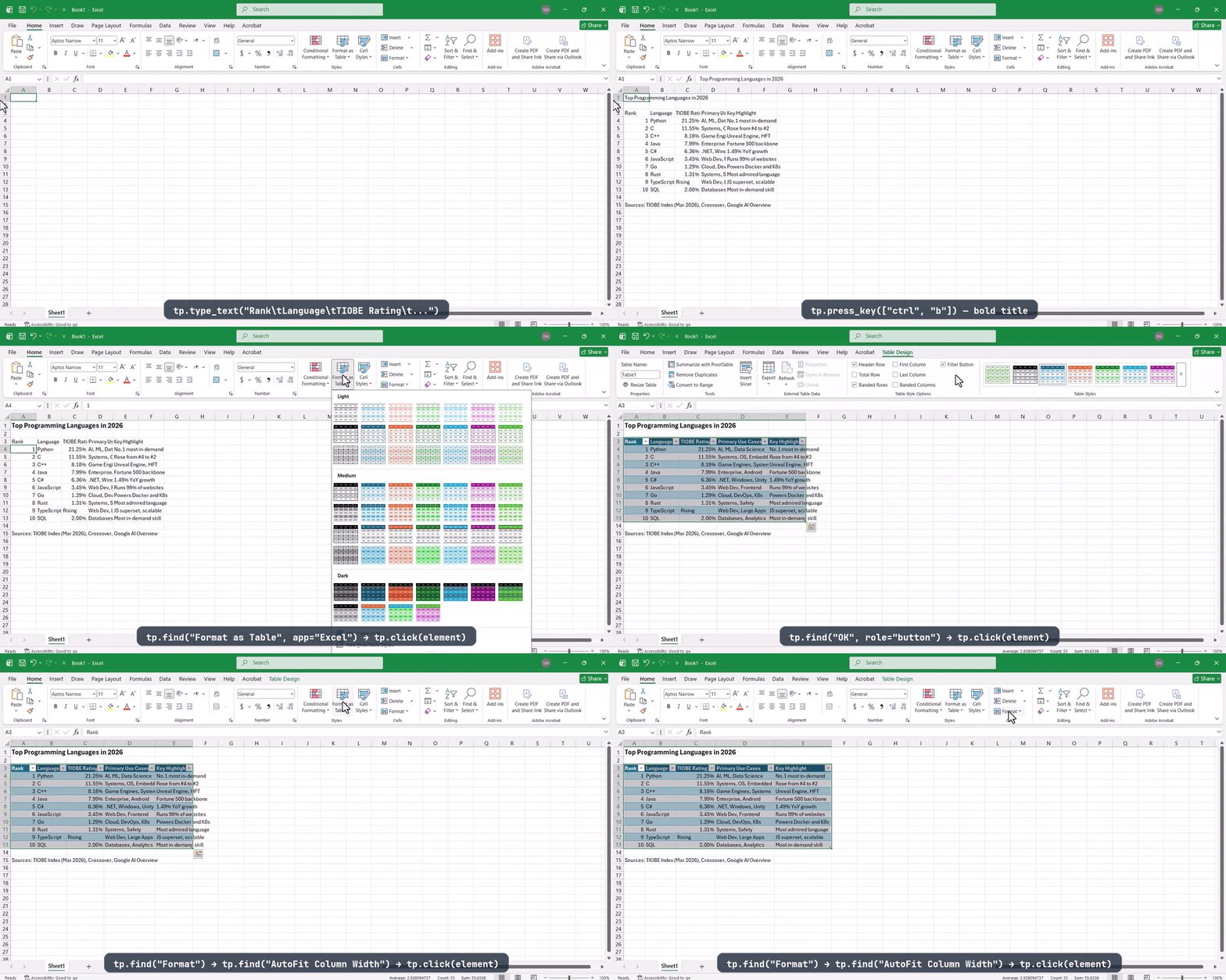
AI agent researches data in Chrome, then creates a formatted Excel table — full task completed in ~12 minutes
Touchpoint is a cross-platform Python library for reading and interacting with desktop UI through native accessibility APIs. One import, one API — works on Linux, macOS, and Windows, with built-in support for Chromium and Electron apps via CDP (Chrome DevTools Protocol).
Instead of scraping pixels or running vision models, Touchpoint reads the real accessibility tree — structured names, roles, states, and positions for every element on screen. Fast and reliable, with no vision model required. Ships with an MCP server so LLM agents like Claude, Cursor, or any local model can control any desktop app out of the box.
import touchpoint as tp

elements = tp.find("Send", role=tp.Role.BUTTON, app="Slack")
tp.click(elements[0])
| Screenshot / vision | Browser automation | Touchpoint | |
|---|---|---|---|
| Native desktop apps | ⚠️ inaccurate or slow | ❌ | ✅ |
| Browsers | ⚠️ inaccurate or slow | ✅ | ✅ via CDP |
| Electron apps (Slack, VS Code, ...) | ⚠️ inaccurate or slow | ⚠️ web content only | ✅ native + web |
| Structured element data | ❌ needs OCR/vision model | ✅ web only | ✅ names, roles, states, positions |
| Works with local / non-vision models | ❌ | ✅ web only | ✅ all apps |
| Works across Linux, macOS, Windows | ✅ | ✅ | ✅ |
Requires Python 3.10+.
pip install touchpoint-py
Everything is included: your platform's native backend, CDP support for browsers and Electron apps, the MCP server, and screenshot capabilities. Platform-specific dependencies are installed automatically via pip environment markers.
| Platform | Backend | Requirement |
|---|---|---|
| Linux | AT-SPI2 | Install xdotool (required for input + minimize_window) and wmctrl (required for all window management — used for AT-SPI → X11 id mapping). Most desktops include python3-gi and gir1.2-atspi-2.0 — install them if missing. |
| Windows | UI Automation | None — uses built-in COM APIs |
| macOS | Accessibility (AX) | Grant permission: System Settings → Privacy & Security → Accessibility |
import touchpoint as tp

# Discover
apps = tp.apps()                            # ["Firefox", "Slack", "Terminal", ...]
windows = tp.windows()                      # Window objects with title, position, size
all_els = tp.elements(app="Firefox", named_only=True)  # only elements with text labels

# Find
results = tp.find("Search", role=tp.Role.TEXT_FIELD, app="Firefox")

# Act
tp.set_value(results[0], "touchpoint python", replace=True)
tp.press_key("enter")
tp.hotkey("ctrl", "s")                      # keyboard shortcuts

# Wait for UI changes
tp.wait_for("results", app="Firefox", timeout=10)

# Screenshot
img = tp.screenshot()                       # full desktop → PIL.Image
img = tp.screenshot(app="Firefox")           # cropped to app window
Every element has a unique ID like atspi:1234:1:2.0 or cdp:9222:TID:4. Action functions accept either an Element object or a bare ID string — useful for storing references across steps:
results = tp.find("Send", max_results=1)
element_id = results[0].id                  # "atspi:1234:1:5.2"

# later...
tp.click(element_id)                        # works with just the string
Control how results are returned:
tp.elements(app="Slack", format="flat")     # one compact line per element (best for LLMs)
tp.elements(app="Slack", format="tree")     # indented parent/child hierarchy
tp.elements(app="Slack", format="json")     # full JSON with all fields
Touchpoint ships an MCP (Model Context Protocol) server ready for any MCP-compatible client. Use it to let LLM agents like Claude, Cursor, local models, or any tool that supports MCP control your desktop.
Set TOUCHPOINT_MODE=no-vision (default: vision) to switch modes:
screenshot() to see the screen and interact by element ID or coordinates. Best for frontier models with strong vision capabilities.snapshot() to get a compact structured text tree of the active window, then act on element IDs directly. Works with any model including local ones that have no vision capability. Most action tools append auto-verify flags ((new window: ...), (focus moved), (no change detected)) so the agent can detect state changes without taking a screenshot.| Category | Vision mode | No-vision mode |
|---|---|---|
| Orient | screenshot, snapshot, apps, windows | snapshot, diff_snapshot, apps, windows |
| Find | find, get_element | find |
| Read | read_text | read_text |
| Actions | click (element or coordinates), set_value, set_numeric_value, select_text, focus, action | click (element only), set_value, set_numeric_value, select_text, focus, action |
| Keyboard | type_text, press_key | type_text, press_key |
| Mouse | mouse_move, scroll | scroll |
| Window | activate_window, minimize_window, fullscreen_window, close_window, move_window, resize_window | activate_window, minimize_window, fullscreen_window, close_window |
| Waiting | wait_for, wait_for_app, wait_for_window | wait_for, wait_for_app, wait_for_window |
| Health | diagnostics | diagnostics |
The MCP server includes built-in instructions that teach agents the correct workflow for each mode — including the orient → act → verify loop, when to use read_text vs find, and how to recover from errors.
         ┌──────────┐
    ┌───▶│  ORIENT  │  screenshot · apps · windows
    │    └────┬─────┘
    │         ▼
    │    ┌──────────┐
    │    │  LOCATE  │  find · snapshot · get_element
    │    └────┬─────┘
    │         ▼
    │    ┌──────────┐
    │    │   ACT    │  click · set_value · type_text · press_key
    │    └────┬─────┘
    │         ▼
    │    ┌──────────┐
    │    │  VERIFY  │───▶ Done ✅
    │    └────┬─────┘
    │         │ not yet
    └─────────┘
Config file location:
~/Library/Application Support/Claude/claude_desktop_config.json%APPDATA%\Claude\claude_desktop_config.json{
"mcpServers": {
"touchpoint": {
"command": "touchpoint-mcp"
}
}
}
If using a virtualenv, use the full path: "/path/to/venv/bin/touchpoint-mcp"
Add to .vscode/mcp.json in your workspace:
{
"servers": {
"touchpoint": {
"command": "touchpoint-mcp"
}
}
}
Create or edit ~/.cursor/mcp.json:
{
  "mcpServers": {
    "touchpoint": {
      "command": "touchpoint-mcp"
    }
  }
}
Edit ~/.codeium/windsurf/mcp_config.json:
{
  "mcpServers": {
    "touchpoint": {
      "command": "touchpoint-mcp"
    }
  }
}
claude mcp add touchpoint -- touchpoint-mcp
Add to mcpServers in ~/.openclaw/openclaw.json:
{
  "mcpServers": {
    "touchpoint": {
      "command": "touchpoint-mcp"
    }
  }
}
| Variable | Example | Description |
|---|---|---|
TOUCHPOINT_CDP_DISCOVER | true | Auto-discover CDP ports from running processes |
TOUCHPOINT_CDP_PORTS | {"Chrome": 9222} | Explicit app-to-port mapping (JSON) |
TOUCHPOINT_CDP_APP | Google Chrome | Single app name (pair with _PORT) |
TOUCHPOINT_CDP_PORT | 9222 | Single port (pair with _APP) |
TOUCHPOINT_CDP_REFRESH_INTERVAL | 5.0 | Seconds between CDP port scans |
TOUCHPOINT_SCALE_FACTOR | 1.25 | Display scale override |
TOUCHPOINT_FUZZY_THRESHOLD | 0.6 | Minimum match score for find() (0.0–1.0) |
TOUCHPOINT_FALLBACK_INPUT | true | Use coordinate fallback when native actions fail |
TOUCHPOINT_MAX_ELEMENTS | 5000 | Maximum elements per query |
TOUCHPOINT_MAX_DEPTH | 20 | Default tree depth limit |
TOUCHPOINT_AX_MESSAGING_TIMEOUT | 1.0 | Max seconds to wait for a macOS AX app reply |
Native accessibility APIs return limited data for Electron and Chromium apps (Slack, Discord, VS Code, etc.). Touchpoint's CDP backend connects via Chrome DevTools Protocol to get the full web content.
Auto-discovery is enabled by default — Touchpoint automatically finds running browsers and Electron apps that were launched with a debug port. No manual configuration needed beyond launching the app with the flag.
# Linux
google-chrome --remote-debugging-port=9222 --user-data-dir=/tmp/tp-chrome

# macOS
open -na "Google Chrome" --args --remote-debugging-port=9222 --user-data-dir=/tmp/tp-chrome

# Windows
start chrome --remote-debugging-port=9222 --user-data-dir=%TEMP%\tp-chrome
import touchpoint as tp

tp.configure(cdp_discover=True)             # auto-discover from running processes
# or
tp.configure(cdp_ports={"Google Chrome": 9222})  # explicit mapping
source parameter:tp.elements(app="Google Chrome", source="full") # native chrome + web content (default)
tp.elements(app="Google Chrome", source="cdp_ax") # web content only (CDP accessibility tree)
tp.elements(app="Google Chrome", source="native") # native UI only (toolbar, tabs, menus)
tp.elements(app="Google Chrome", source="dom") # DOM walker (catches what AX misses)
CDP results are merged with native backend results — you get the toolbar and window controls from AT-SPI2/UIA/AX, combined with the full web page content from CDP, in a single elements() call.
source="ax" remains accepted as a compatibility alias for
source="cdp_ax". Prefer cdp_ax in new code so it is not confused with
the native macOS AX backend.
| Function | Description |
|---|---|
tp.apps() | List application names in the accessibility tree |
tp.windows() | All windows with id, title, app, position, size, active state |
tp.elements(app, role, states, ...) | UI elements, with filtering, tree mode, and formatting |
tp.element_at(x, y) | Deepest element at screen coordinates |
tp.get_element(id) | Fresh snapshot of a single element by ID |
| Function | Description |
|---|---|
tp.find(query, app, role, ...) | Search by name — 4-stage matching: exact → contains → word → fuzzy |
tp.wait_for(query, ...) | Poll until elements appear (or disappear with gone=True) |
tp.wait_for_app(app, ...) | Poll until an app appears or disappears |
tp.wait_for_window(title, ...) | Poll until a window appears or disappears |
| Function | Description |
|---|---|
tp.click(element) | Click via accessibility action, with coordinate fallback |
tp.double_click(element) | Double-click |
tp.right_click(element) | Right-click / context menu |
tp.set_value(element, text) | Set text content (replace=True to clear first) |
tp.set_numeric_value(element, n) | Set slider or spinbox value |
tp.select_text(element, text) | Select a substring within text content across Linux, Windows, macOS, and web/CDP |
tp.select_text_range(element, start, end) | Select a character range when you already know the offsets |
tp.focus(element) | Move keyboard focus |
tp.action(element, name) | Execute a raw accessibility action by name |
tp.activate_window(window) | Bring a window to the foreground (restores from minimized) |
tp.minimize_window(window) | Minimize a window. Use activate_window to restore. |
tp.fullscreen_window(window, fullscreen=True) | Enter or exit fullscreen for a window |
tp.close_window(window) | Politely close a window |
tp.move_window(window, x, y) | Move a window to a new screen position |
tp.resize_window(window, width, height) | Resize a window to width × height pixels |
| Function | Description |
|---|---|
tp.type_text(text) | Type into the currently focused element |
tp.press_key(key) | Press and release a key ("enter", "tab", "escape") |
tp.hotkey(*keys) | Key combination (tp.hotkey("ctrl", "s")) |
tp.click_at(x, y) | Click at screen coordinates |
tp.double_click_at(x, y) | Double-click at coordinates |
tp.right_click_at(x, y) | Right-click at coordinates |
tp.mouse_move(x, y) | Move the cursor |
tp.scroll(direction, amount) | Scroll at current cursor position |
| Function | Description |
|---|---|
tp.screenshot(app, element, ...) | Full desktop or cropped to app/window/element/monitor |
tp.monitor_count() | Number of connected monitors |
tp.configure(...) | Set runtime options (see Configuration) |
tp.diagnostics() | Report backend, input, CDP, timeout, and dependency health |
All action functions accept an Element object or a string ID. elements(), find(), and get_element() support format="flat", format="json", or format="tree" (elements only) to return pre-formatted strings instead of objects. Window management is implemented across Linux AT-SPI2, Windows UIA, and macOS AX backends.
┌───────────────────────────────────────────────────────┐
│               import touchpoint as tp                 │
│  tp.find() · tp.click() · tp.screenshot() · ...       │
│                    (Public API)                       │
├─────────────────────────┬─────────────────────────────┤
│     Backend (ABC)       │    InputProvider (ABC)      │
├─────────────────────────┼─────────────────────────────┤
│  AT-SPI2     (Linux)    │  Xdotool       (X11)        │
│  UIA         (Windows)  │  SendInput     (Win32)      │
│  AX          (macOS)    │  CGEvent       (macOS)      │
│  CDP         (browsers) │                             │
├─────────────────────────┴─────────────────────────────┤
│  Utilities: formatter · matcher · screenshot · scale  │
└───────────────────────────────────────────────────────┘
Two-layer design:
CDP runs alongside the platform backend. Their results are merged: native window chrome (toolbar, tabs, menus) from AT-SPI2/UIA/AX, plus full web content from CDP, unified under one API.
For detailed internals, see ARCHITECTURE.md.
tp.configure(
    fuzzy_threshold=0.6,          # minimum match score for find() (0.0–1.0)
    fallback_input=True,          # use InputProvider when native actions fail
    type_chunk_size=40,           # split long text into chunks for typing (0 = disable)
    max_elements=5000,            # max elements per query
    max_depth=20,                 # default tree depth limit
    scale_factor=None,            # display scale override (None = auto-detect)
    cdp_ports={"Chrome": 9222},   # explicit CDP port mapping
    cdp_discover=True,            # auto-discover CDP ports from running processes
    cdp_refresh_interval=5.0,     # seconds between CDP target scans
    ax_messaging_timeout=1.0,     # max seconds to wait for a macOS AX app reply
)
tp.diagnostics() returns a JSON-friendly health report. It includes the
active backend, input provider, CDP targets, optional platform tools, configured
timeouts, and macOS apps recently skipped after an AX messaging timeout.
git clone https://github.com/Touchpoint-Labs/touchpoint.git
cd touchpoint
python -m venv .venv && source .venv/bin/activate
pip install -e ".[dev]"
pytest
Alpha — fully functional and tested on all three platforms. The API may change before 1.0 based on user feedback.
| Platform | Backend | Input | CDP | Tests |
|---|---|---|---|---|
| Linux (X11) | ✅ AT-SPI2 | ✅ xdotool | ✅ | ✅ |
| Windows | ✅ UIA | ✅ SendInput | ✅ | ✅ |
| macOS | ✅ AX | ✅ CGEvent | ✅ | ✅ |
Wayland input — The Linux InputProvider uses xdotool, which requires X11. On pure Wayland (no XWayland), keyboard/mouse simulation is unavailable. The accessibility tree and native actions still work.
Synchronous CDP — CDP calls block on WebSocket responses. JavaScript dialogs (alert, confirm, prompt) are auto-dismissed to prevent deadlocks. An async rewrite is planned.
No browser navigation API — Touchpoint doesn't have built-in URL navigation. Agents can navigate by interacting with UI elements directly: find the address bar, type a URL, press Enter.
CDP windows are page targets, not OS windows — but window management still works: tp.activate_window() brings the target forward via CDP, and minimize/fullscreen/close/move/resize on a surfaced cdp: window are routed to the underlying native OS window (resolved by owning PID) and handled by the platform backend. They raise ActionFailedError only if no native OS window for that target can be found (e.g. it has been closed).
Backend role/state parity is still uneven — macOS AX and Windows UIA both improved significantly in 0.3.0, but Windows still relies on more heuristics and has more unmapped long-tail roles than the other backends.
libei / xdg-desktop-portal RemoteDesktop when X11 isn't availableClaim this server with your GitHub account to request manual ownership verification.
Link to the catalog listing for Touchpoint MCP server for desktop app control from your README. This badge does not certify ownership, compatibility or security.
[](https://awesome-mcp.com/servers/touchpoint)Public repository statistics could not be verified. Check the configured source address; unavailable counts are not zero.
来源、范围和时段分别列出;不相加,不代表安装人数、活跃用户或安全审核。
尚无已审核的包 / 镜像标识,暂不展示下载统计。
Alternative and complementary servers in the same category
A directory listing describing a cancellation-letter and mailing-address service. The configured public GitHub repository returned 404 during source verification.

A hosted MCP service for browsing and searching through Singapore mobile-network proxies.

A directory listing describing a Markdown-to-PDF service. The configured public GitHub repository returned 404 during source verification.