
A directory listing describing a cancellation-letter and mailing-address service. The configured public GitHub repository returned 404 during source verification.
Repository stats unavailable
Developer Tools
An MCP server paired with a .NET CLI that lets AI agents build Unity scenes, write C# scripts, validate projects and ship games with verification and rollback.
unityctl MCP server and CLI for controlling the Unity Editor is cataloged as an MCP server attributed to jason-hub-star. An MCP server paired with a .NET CLI that lets AI agents build Unity scenes, write C# scripts, validate projects and ship games with verification and rollback. It is categorized under developer tools. See the capability inspector for recorded interfaces and their independent review status; consult upstream documentation for the current interface.
Installation configuration is not reviewed. No executable setup is offered for this entry; inspect the source repository before proceeding.
Catalog license label: MIT. Check the source repository's current license and terms before using, modifying or distributing this software.
能力定义尚未审核。未核验的采集内容不会作为可信接口展示。
暂无可展示的已审核记录。这不表示上游不支持此能力。
暂无可展示的已审核记录。这不表示上游不支持此能力。
暂无可展示的已审核记录。这不表示上游不支持此能力。
Email delivery is not connected. This page does not collect email addresses or create subscriptions.
Browse the registry for current listings instead.
Reviews for unityctl MCP server and CLI for controlling the Unity Editor are not available yet
Review publishing and storage are not connected. This page does not collect or publish ratings or comments, including after sign-in.
It exposes 12 MCP tools and loads canonical command schemas on demand rather than sending all schemas every turn.
Batch execution can roll back on failure and an undo command is available, so mistakes need not be permanent.
README.md · 51b99280c04f · 采集于 2026-11-13 09:56:30 UTC
保留上游原文,不做 AI 改写。为安全起见过滤脚本、表单和不安全链接。
当前显示最后一次成功采集的文档快照,请以来源页面为准。




Give your AI agent 179 commands to build Unity scenes, write C# scripts, validate builds, and ship games — with automatic rollback when things go wrong.
179 CLI commands · 12 MCP tools · 966 PR .NET tests · Windows / macOS / Linux
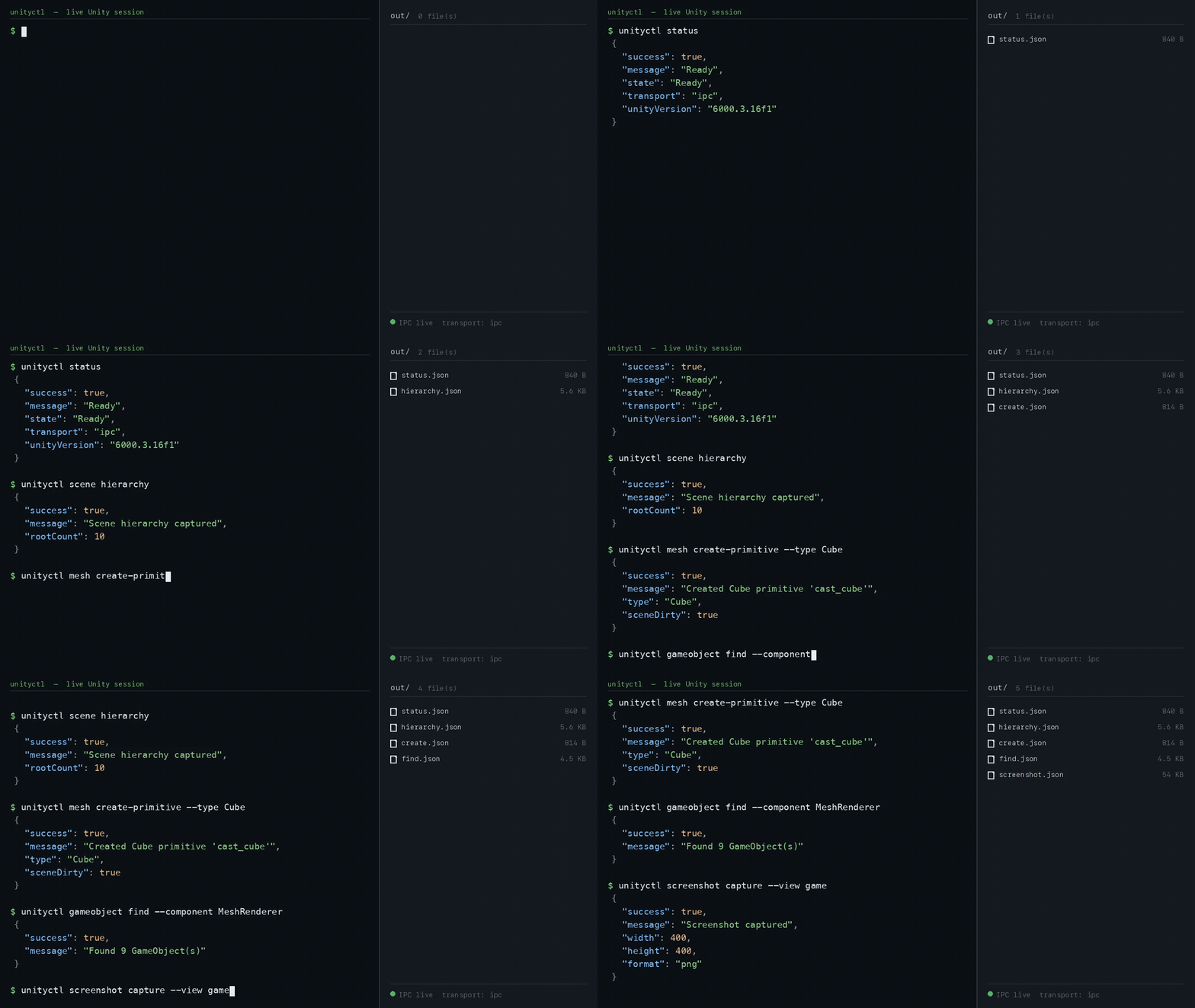
Unrehearsed session against a live Unity 6000.3.16f1 Editor — every command answers in structured JSON and drops an artifact in out/.
Benchmarked head-to-head against the official Unity CLI (1.0.0-beta.2 + com.unity.pipeline) on the same editor session — faster round-trips, smaller responses, and every measured gap absorbed the same day. See the benchmark.
| Measured (same editor, same tasks) | unityctl v0.6.0 | Official Unity CLI |
|---|---|---|
| Scene hierarchy read | 286 ms / 919 B | 617 ms / 1,602 B |
| Play enter → console → stop | 965 ms | 2,588 ms |
| Multi-statement C# eval | 1,755 ms (opt-in gate) | 2,634 ms (always on) |
| Domain-reload survival (unattended) | 313–516 ms | 739 ms |
| Unattended test run | 1 passed (4.2 s) | false success — 0 tests ran |
| Wrong arguments | explicit failure + candidate list | silently ignored, returns success |
| Screenshot with no camera in scene | captures the view | fails |
Quality gates: every PR runs the .NET Shared/Core/Cli/Mcp test suites on Windows, macOS, and Linux. Unity Editor-dependent validation is separated into the Unity Integration workflow, with init, sample-project doctor, check, scene hierarchy, player-settings set/get, and workflow verify evidence uploaded from nightly/manual runs. Unity Integration requires either a UNITY_LICENSE or UNITY_SERIAL GitHub secret.
Contributors: see CONTRIBUTING.md for the test trust checklist, flaky-test policy, command sync checklist, and Unity live-validation split.
AI agents can write code, but they can't build games — because Unity has no programmatic interface for scene editing, asset management, or project validation.
Existing Unity MCP servers try to fix this, but they create new problems for AI agents:
| Pain Point | Impact on AI Agent |
|---|---|
| 45 KB+ schemas loaded every turn | Wastes tokens on tool definitions instead of reasoning |
| No validation feedback | Agent can't tell if the scene is broken after changes |
| No rollback | One bad command corrupts the project state |
| WebSocket drops on Play Mode | Agent loses connection during Unity's Domain Reload |
| Editor must be open | CI/CD pipelines can't run without a GUI |
unityctl is a .NET CLI + MCP server that turns Unity Editor into a programmable API.
For AI agents, this means a closed-loop automation cycle — the agent doesn't just execute commands, it can verify results, diagnose failures, and recover from mistakes:
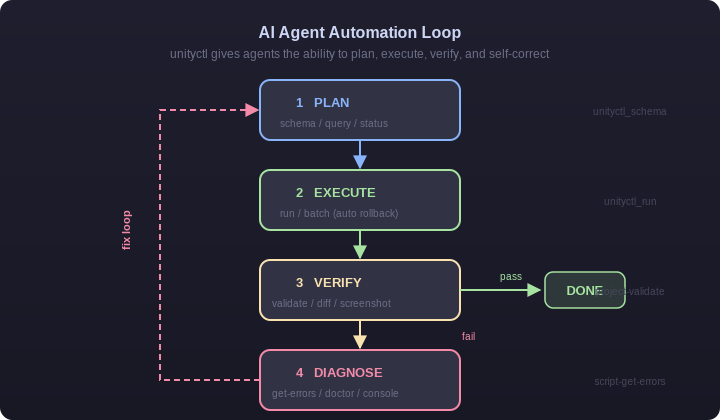
Other tools give agents hands. unityctl gives agents hands, eyes, and a safety net.
| unityctl | Existing Unity MCP | |
|---|---|---|
| Schema overhead | 5 KB per session (9x smaller) | 45 KB+ loaded every turn |
| Validation loop | project validate + scene diff + screenshot capture | Agent flies blind |
| Error recovery | script get-errors with file/line/column | Raw console output or nothing |
| Safe experimentation | batch execute --rollbackOnFailure + undo | No rollback — mistakes are permanent |
| Connection stability | Named Pipe — survives Domain Reload | WebSocket drops, reconnect needed |
| CI/CD | check / test / build --dry-run work headless | Editor must be open |
| Diagnostics | doctor classifies failures + suggests next steps | "Connection failed" |
| Commands | 179 (read + write + validate + diagnose) | ~34-200 tools |
| Audit trail | NDJSON flight recorder for every command | No history |
| Runtime | Native .NET — no Python/TS bridge | Bridge overhead |
| Install | dotnet tool install -g unityctl | Node.js + npm + port config |
| License | MIT | Varies |
AI agent costs are dominated by tool schemas sent every turn. unityctl uses on-demand schema loading:
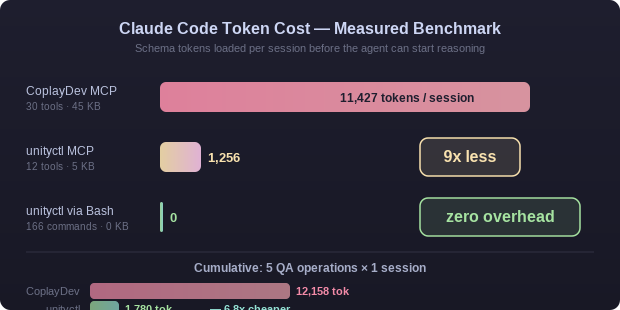
The CLI exposes 179 entry points, including convenience wrappers. The 12 MCP
tools keep prompts small by loading 171 canonical command schemas on demand
through unityctl_query, unityctl_run, and unityctl_schema.
Standalone binary — no .NET SDK required (recommended):
# macOS (Apple Silicon) — swap in unityctl-osx-x64 / unityctl-linux-x64 as needed
curl -L https://github.com/Jason-hub-star/unityctl/releases/latest/download/unityctl-osx-arm64.tar.gz | tar xz
./unityctl --version
Windows: download unityctl-win-x64.zip from Releases and unzip.
Each archive contains a self-contained unityctl + unityctl-mcp executable and the embedded Unity plugin template.
Or via .NET tool (requires .NET 10 SDK):
dotnet tool install -g unityctl
dotnet tool install -g unityctl-mcp
Optional agent workflow skill for Claude Code and Codex:
npx skills add Jason-hub-star/unityctl \
  --skill unityctl-workflows \
  -a claude-code -a codex
The skill teaches agents to discover the live command surface, target the right Unity project, and close every edit with structured readback and verification.
Bootstrap notes:
--source accepts a local Unityctl.Plugin folder or a Git URL: https://github.com/Jason-hub-star/unityctl.git?path=/src/Unityctl.Plugin#v0.6.6# 1. Install the Editor plugin
unityctl init --project /path/to/project \
--source "https://github.com/Jason-hub-star/unityctl.git?path=/src/Unityctl.Plugin#v0.6.6"
# 2. Open the project in Unity Editor, then verify connectivity
unityctl ping --project /path/to/project --json
unityctl status --project /path/to/project --json
# 3. Start building
unityctl gameobject create --name "Player" --project /path/to/project
unityctl component add --id "<PlayerId>" --type "Rigidbody" --project /path/to/project
unityctl scene save --project /path/to/project
# 4. Validate
unityctl project validate --project /path/to/project --json
# 5. Build
unityctl build --project /path/to/project --dry-run # 13 preflight checks
One command per client — it merges into the existing config instead of replacing it:
unityctl mcp install --client claude-code            # or cursor / codex
unityctl mcp install --client vscode --project .     # VS Code is workspace-scoped
unityctl mcp install --client cursor --dry-run       # preview, writes nothing
Or add it by hand:
{
  "mcpServers": {
    "unityctl": {
      "command": "unityctl-mcp"
    }
  }
}
See GitHub Releases for version history.
MIT — see LICENSE
Claim this server with your GitHub account to request manual ownership verification.
Link to the catalog listing for unityctl MCP server and CLI for controlling the Unity Editor from your README. This badge does not certify ownership, compatibility or security.
[](https://awesome-mcp.com/servers/unityctl)Public repository statistics could not be verified. Check the configured source address; unavailable counts are not zero.
来源、范围和时段分别列出;不相加,不代表安装人数、活跃用户或安全审核。
尚无已审核的包 / 镜像标识,暂不展示下载统计。
Alternative and complementary servers in the same category
A directory listing describing a cancellation-letter and mailing-address service. The configured public GitHub repository returned 404 during source verification.

A hosted MCP service for browsing and searching through Singapore mobile-network proxies.

A directory listing describing a Markdown-to-PDF service. The configured public GitHub repository returned 404 during source verification.