Model Context Protocol (MCP)
🚀 Why Is Everyone – Suddenly! – Obsessed With MCP/Servers? (Spoiler: It’s Redefining AI Orchestration)
Model Context Protocol (MCP) is an open standard developed by Anthropic in late 2024 to address a critical challenge in AI integration: connecting AI assistants with real-world data sources and systems[1][3]. MCP serves as a standardized interface for AI models to interact with external tools, databases, and APIs, similar to how USB-C functions as a universal port for devices[4][7].
Key Features and Benefits
-
Standardized Integration: MCP eliminates the need for custom integrations, allowing developers to connect AI models to various data sources using a single protocol.
-
Dynamic Discovery: AI agents can automatically detect and utilize available MCP servers and their capabilities without hard-coded integration.
-
Enhanced Security: MCP enables developers to implement security measures within servers, ensuring AI agents only access permitted data or actions.
-
Flexibility: The protocol is model-agnostic, allowing any AI model (e.g., Claude, GPT-4, open-source LLMs) to use MCP-enabled tools.
-
Ecosystem Growth: Since its introduction, MCP has gained significant traction, with over 1,000 community-built MCP servers available by February 2025.
Impact on AI Development
MCP is transforming the AI landscape by:
-
Simplifying Integration: Reducing the complexity of connecting AI models to external systems from an "N×M" problem to an "N+M" problem.
-
Enabling Complex Workflows: Facilitating multi-step, cross-system operations for AI agents, such as event planning that involves multiple platforms.
-
Fostering Collaboration: Providing a shared workspace for multi-agent systems, allowing specialized AI agents to coordinate tasks efficiently.
-
Enhancing Personalization: Enabling secure integration of personal AI assistants with users' data and applications.
-
Improving Enterprise Governance: Standardizing AI access to internal tools and enabling better monitoring and control of AI interactions.
As of March 2025, MCP has become a significant topic in the AI community, with many viewing it as a crucial component for developing more integrated and context-aware AI systems. Its open nature and backing by a major AI player have contributed to its rapid adoption and evolution, positioning MCP as a potential de facto standard for AI-world integration.
Model Context Protocol (MCP) - weather quick start :
Overview
This document provides a comprehensive guide to building a simple Model Context Protocol (MCP) weather server and connecting it to a host, Claude for Desktop. The server exposes two tools: get-alerts and get-forecast, which fetch weather alerts and forecasts using the National Weather Service API.
Table of Contents
- Introduction
- Prerequisites
- System Requirements
- Setup
- Building the Server
- Testing with Claude for Desktop
- Under the Hood
- Troubleshooting
Introduction
This guide walks you through creating an MCP server to enhance LLMs (like Claude) with real-time weather data. The server utilizes the MCP framework to expose tools for fetching weather alerts and forecasts, addressing the LLM's lack of native environmental awareness.
Prerequisites
Before starting, ensure you have:
- Familiarity with Python
- Understanding of LLMs like Claude
System Requirements
- Python 3.10 or higher
- MCP SDK 1.2.0 or higher
Setup
-
Install uv:
window
powershell -ExecutionPolicy ByPass -c "irm https://astral.sh/uv/install.ps1 | iex"
macos/linux
curl -LsSf https://astral.sh/uv/install.sh | sh
Restart your terminal to ensure the uv command is recognized.
-
Create and Set Up Project:
window(cd to your dev repo_path run below command in powershell/..)
# Create a new directory for our project
  uv init weather
  cd weather

  # Create virtual environment and activate it
  uv venv
  .venv\Scripts\activate

  # Install dependencies
  uv add mcp[cli] httpx

  # Create our server file
  new-item weather.py
macos/linux
# Create a new directory for our project
uv init weather
cd weather

# Create virtual environment and activate it
uv venv
source .venv/bin/activate

# Install dependencies
uv add "mcp[cli]" httpx

# Create our server file
touch weather.py
Building the Server
Importing Packages and Setting Up the Instance
Add the following code to the top of your weather.py file:
from typing import Any
import httpx
from mcp.server.fastmcp import FastMCP


# Initialize FastMCP server
mcp = FastMCP("weather")

# Constants
NWS_API_BASE = "https://api.weather.gov"
USER_AGENT = "weather-app/1.0"


#helper function
async def make_nws_request(url: str) -> dict[str, Any] | None:
    """Make a request to the NWS API with proper error handling."""
    headers = {
        "User-Agent": USER_AGENT,
        "Accept": "application/geo+json"
    }
    async with httpx.AsyncClient() as client:
        try:
            response = await client.get(url, headers=headers, timeout=30.0)
            response.raise_for_status()
            return response.json()
        except Exception:
            return None

def format_alert(feature: dict) -> str:
    """Format an alert feature into a readable string."""
    props = feature["properties"]
    return f"""
Event: {props.get('event', 'Unknown')}
Area: {props.get('areaDesc', 'Unknown')}
Severity: {props.get('severity', 'Unknown')}
Description: {props.get('description', 'No description available')}
Instructions: {props.get('instruction', 'No specific instructions provided')}
"""


@mcp.tool()
async def get_alerts(state: str) -> str:
    """Get weather alerts for a US state.

    Args:
        state: Two-letter US state code (e.g. CA, NY)
    """
    url = f"{NWS_API_BASE}/alerts/active/area/{state}"
    data = await make_nws_request(url)

    if not data or "features" not in data:
        return "Unable to fetch alerts or no alerts found."

    if not data["features"]:
        return "No active alerts for this state."

    alerts = [format_alert(feature) for feature in data["features"]]
    return "\n---\n".join(alerts)

@mcp.tool()
async def get_forecast(latitude: float, longitude: float) -> str:
    """Get weather forecast for a location.

    Args:
        latitude: Latitude of the location
        longitude: Longitude of the location
    """
    # First get the forecast grid endpoint
    points_url = f"{NWS_API_BASE}/points/{latitude},{longitude}"
    points_data = await make_nws_request(points_url)

    if not points_data:
        return "Unable to fetch forecast data for this location."

    # Get the forecast URL from the points response
    forecast_url = points_data["properties"]["forecast"]
    forecast_data = await make_nws_request(forecast_url)

    if not forecast_data:
        return "Unable to fetch detailed forecast."

    # Format the periods into a readable forecast
    periods = forecast_data["properties"]["periods"]
    forecasts = []
    for period in periods[:5]:  # Only show next 5 periods
        forecast = f"""
                    {period['name']}:
                    Temperature: {period['temperature']}°{period['temperatureUnit']}
                    Wind: {period['windSpeed']} {period['windDirection']}
                    Forecast: {period['detailedForecast']}
                    """
        forecasts.append(forecast)

    return "\n---\n".join(forecasts)


if __name__ == "__main__":
    # Initialize and run the server
    mcp.run(transport='stdio')
Running the Server
To verify your server, run:
uv run weather.py
Testing Your Server with Claude for Desktop
Configuration
- Install/Update Claude for Desktop: Ensure you have the latest version installed.
- Configure MCP Servers: Open or create the configuration file at
~/Library/Application Support/Claude/claude_desktop_config.json.
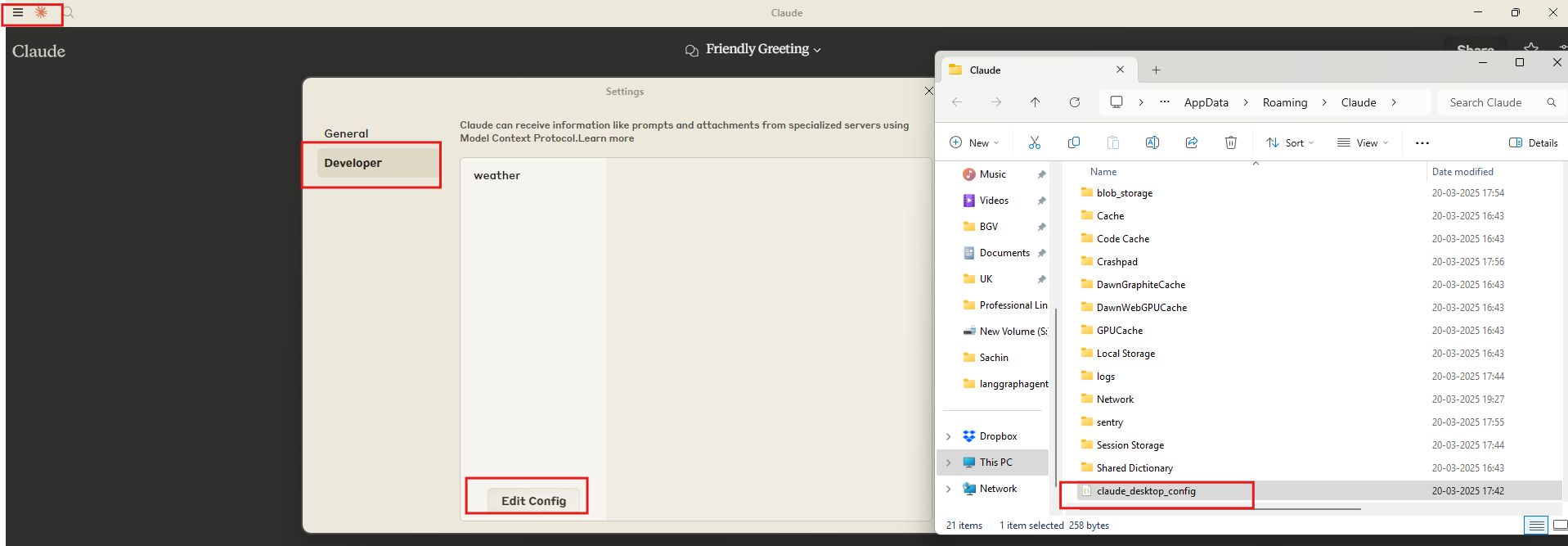
-> RESTART THE SYSTEM IF NOT WORKS
-
Add Server Configuration:
{
  "mcpServers": {
    "weather": {
      "command": "uv",
      "args": [
        "--directory",
        "/ABSOLUTE/PATH/TO/PARENT/FOLDER/weather",# S:\\Dev\\weather
        "run",
        "weather.py"
      ]
    }
  }
}
Replace /ABSOLUTE/PATH/TO/PARENT/FOLDER/weather with the correct absolute path to your project directory. You may need to provide the full path to the uv executable in the command field (use which uv on MacOS/Linux or where uv on Windows to find it).
-
Restart Claude for Desktop.
Test with Commands
- Verify Tool Detection: Look for the hammer icon in Claude for Desktop. Clicking it should list the
get_alerts and get_forecast tools.
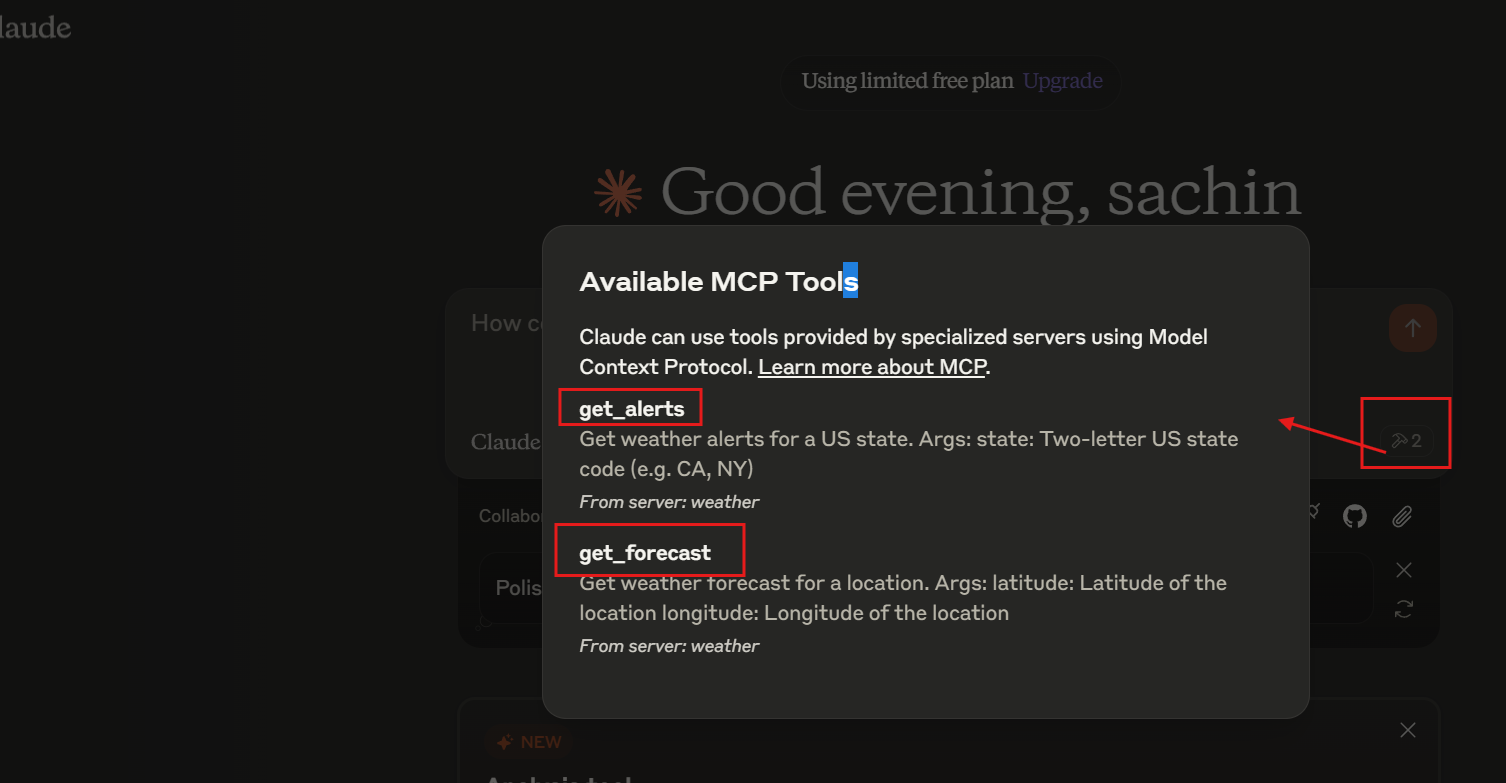 2. Run Test Queries:
- "What’s the weather in Sacramento?"
- "What are the active weather alerts in Texas?"

Note: These queries work for US locations only, as they use the US National Weather Service.
What’s Happening Under the Hood
- The client sends your question to Claude.
- Claude analyzes available tools and decides which to use.
- The client executes the chosen tool(s) through the MCP server.
- Results are sent back to Claude.
- Claude formulates and displays a natural language response.
Troubleshooting
-
Getting logs from Claude for Desktop
mcp.log: General MCP connections and failures.mcp-server-SERVERNAME.log: Error logs from the named server.
tail -n 20 -f ~/Library/Logs/Claude/mcp*.log
-
Server not showing up in Claude
- Check
claude_desktop_config.json file syntax.
- Ensure the project path is absolute.
- Restart Claude for Desktop completely.
-
Tool calls failing silently
- Check Claude’s logs for errors.
- Verify your server builds and runs without errors.
- Try restarting Claude for Desktop.
-
None of this is working. What do I do?
-
Error: Failed to retrieve grid point data
- Coordinates outside the US
- NWS API issues
- Rate limiting
Fix:
-
Error: No active alerts for [STATE]
- No current weather alerts for that state. Try a different state.
For more advanced troubleshooting, check out the Debugging MCP guide.
MCP Inspector
npx @modelcontextprotocol/inspector uv run weather.py
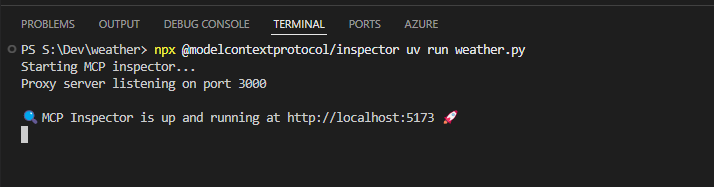
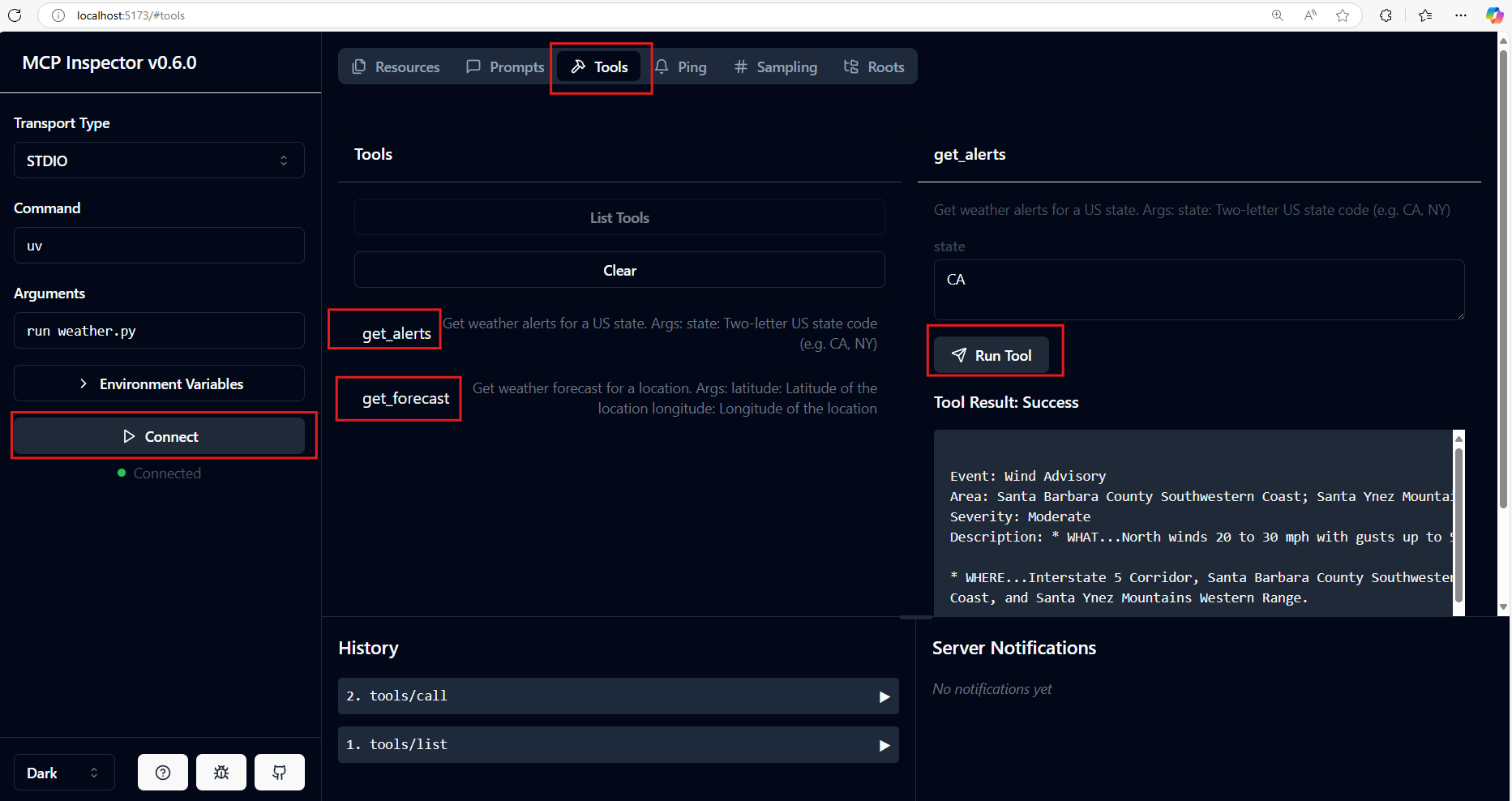
done with local test
Published in Github
🔗 Github - aitiwari/weather



