
An AI receptionist platform with an MCP server for accessing business calls, contacts and appointments from AI assistants.
52
Communication
A Model Context Protocol server that gives AI assistants access to Cisco Webex messaging capabilities through dozens of composable tools.
Webex MCP Server is cataloged as an MCP server attributed to kashyap-ai-ml-solutions. A Model Context Protocol server that gives AI assistants access to Cisco Webex messaging capabilities through dozens of composable tools. It is categorized under communication social. See the capability inspector for recorded interfaces and their independent review status; consult upstream documentation for the current interface.
Installation configuration is not reviewed. No executable setup is offered for this entry; inspect the source repository before proceeding.
Catalog license label: MIT License. Check the source repository's current license and terms before using, modifying or distributing this software.
能力定义尚未审核。未核验的采集内容不会作为可信接口展示。
暂无可展示的已审核记录。这不表示上游不支持此能力。
暂无可展示的已审核记录。这不表示上游不支持此能力。
暂无可展示的已审核记录。这不表示上游不支持此能力。
Email delivery is not connected. This page does not collect email addresses or create subscriptions.
Browse the registry for current listings instead.
Reviews for Webex MCP Server are not available yet
Review publishing and storage are not connected. This page does not collect or publish ratings or comments, including after sign-in.
Yes, it supports STDIO mode, the default for clients like Claude Desktop, and HTTP mode using StreamableHTTP.
The server provides 52 tools covering messages, rooms, teams, memberships, people, webhooks, and enterprise features.
README.md · d3779c625a23 · 采集于 2026-11-13 11:26:07 UTC
保留上游原文,不做 AI 改写。为安全起见过滤脚本、表单和不安全链接。
当前显示最后一次成功采集的文档快照,请以来源页面为准。

A Model Context Protocol (MCP) server that provides AI assistants with comprehensive access to Cisco Webex messaging capabilities.


AI agents can use this server as a collaboration action layer: translate a business goal into a sequence of Webex operations, choose the relevant capabilities, and carry the workflow through to completion. That can mean notifying customers, assembling incident-response rooms, maintaining customer teams and spaces, governing people and memberships, reacting to Webex events, or connecting enterprise content and approval interactions.
Because the server exposes messages, rooms, teams, memberships, people, webhooks, events, tabs, attachment actions, and ECM folders as composable MCP tools, agents can build workflows around the business need instead of being limited to one hard-coded automation.
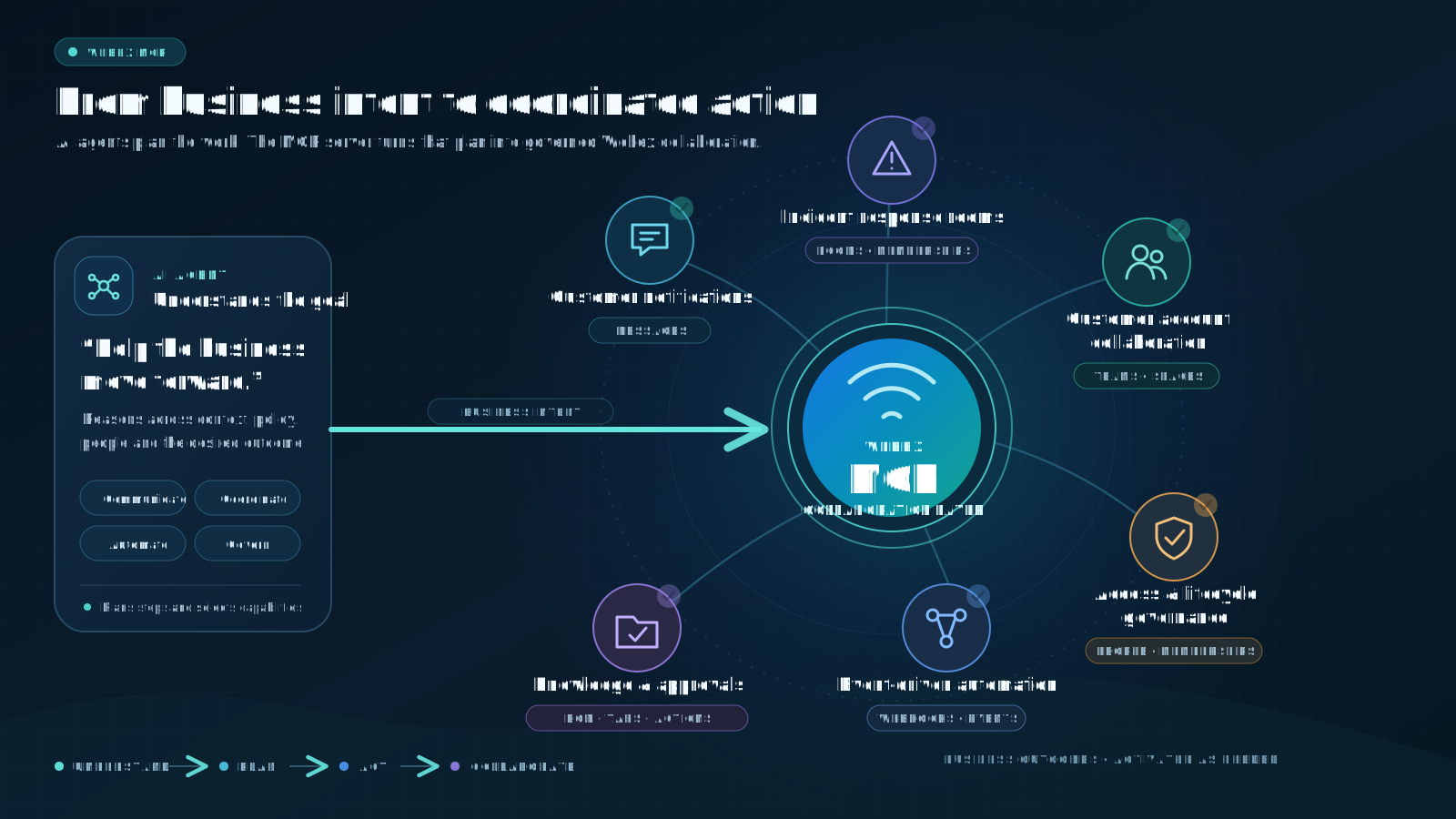

▶ Watch the 15-second explainer with sound
This explainer was created from a plain-language request using the Agentic Media Harness. Its agentic-media plugin turns Claude Code or Codex into a production media workflow: it reads your repository, enhances the prompt, generates images or videos, checks motion and script accuracy, iterates on quality, and records every prompt, score, and dollar spent.
Install the plugin once, then create repository-aware product videos, hero images, infographics, and launch assets without leaving your coding agent.
pip install "git+ssh://git@github.com/Kashyap-AI-ML-Solutions/agentic-media-harness.git#subdirectory=packages/amh"
claude plugin marketplace add Kashyap-AI-ML-Solutions/agentic-media-harness
claude plugin install agentic-media@agentic-media-harness
export GEMINI_API_KEY=your_key_here   # create + enable billing: https://aistudio.google.com/apikey
pip install "git+ssh://git@github.com/Kashyap-AI-ML-Solutions/agentic-media-harness.git#subdirectory=packages/amh"
codex plugin marketplace add Kashyap-AI-ML-Solutions/agentic-media-harness
codex plugin add agentic-media@agentic-media-harness
export GEMINI_API_KEY=your_key_here   # optional for images; required for video
You can put GEMINI_API_KEY=your_key in the repository's .env file instead. Never commit that file.
Then open any repository and ask:
Use the media-video skill to create a short explainer video for this repository. Read the README first. My budget is $2.50.
This MCP server enables AI assistants to interact with Webex messaging through 52 different tools covering:
fetch won't be present. Tools use fetch to make HTTP calls. To work around this, you can modify the tools to use node-fetch instead. Make sure that node-fetch is installed as a dependency and then import it as fetch into each tool file.Webex Bearer tokens are short-lived. Your current token expires in 12 hours. To renew:
Clone and install dependencies:
git clone <repository-url>
cd webex-messaging-mcp-server
npm install
Configure environment:
cp .env.example .env
# Edit .env with your Webex API token
Test the server:
# List available tools
node index.js tools

# Discover tools with detailed analysis
npm run discover-tools

# Start MCP server (STDIO mode - default)
node mcpServer.js

# Start MCP server (HTTP mode)
npm run start:http
The server includes comprehensive tool discovery capabilities:
# Human-readable tool analysis
npm run discover-tools

# JSON output for programmatic use
npm run discover-tools -- --json

# Filter tools by category
ENABLED_TOOLS=create_message,list_rooms npm run discover-tools

# Get help
npm run discover-tools -- --help
The tools-manifest.json file provides:
Tools are organized by functionality:
All 52 tools publish MCP annotations plus compact selection and behavior
guidance through tools/list. The original purpose sentence and input schema
remain unchanged; the appended guidance identifies the closest sibling tool,
whether the operation reads or changes Webex state, and how API errors and
rate limits are returned.
Annotations are descriptive hints for MCP clients, not authorization controls. The Webex access token and organization policies remain authoritative.
Build and run:
docker build -t webex-mcp-server .
docker run -i --rm --env-file .env webex-mcp-server
Using docker-compose:
docker-compose up webex-mcp-server
| Variable | Required | Description | Default |
|---|---|---|---|
WEBEX_PUBLIC_WORKSPACE_API_KEY | Yes | Webex API token (without "Bearer " prefix) | - |
WEBEX_API_BASE_URL | No | Webex API base URL | https://webexapis.com/v1 |
WEBEX_USER_EMAIL | No | Your Webex email (for reference) | - |
PORT | No | Port for HTTP mode | 3001 |
MCP_MODE | No | Transport mode (stdio or http) | stdio |
.env fileAdd to your Claude Desktop configuration:
{
  "mcpServers": {
    "webex-messaging": {
      "command": "docker",
      "args": [
        "run",
        "-i",
        "--rm",
        "-e",
        "WEBEX_PUBLIC_WORKSPACE_API_KEY",
        "-e",
        "WEBEX_USER_EMAIL",
        "-e",
        "WEBEX_API_BASE_URL",
        "webex-mcp-server"
      ],
      "env": {
        "WEBEX_USER_EMAIL": "your.email@company.com",
        "WEBEX_API_BASE_URL": "https://webexapis.com/v1",
        "WEBEX_PUBLIC_WORKSPACE_API_KEY": "your_token_here"
      }
    }
  }
}
For HTTP-based MCP clients, start the server in HTTP mode:
# Start HTTP server
npm run start:http

# Server endpoints:
# Health check: http://localhost:3001/health
# MCP endpoint: http://localhost:3001/mcp
The server supports MCP 2025-11-25 protocol with StreamableHTTP transport, including:
mcp-session-id header exposureFor STDIO mode:
docker run -i --rm --env-file .env webex-mcp-server
For HTTP mode:
docker run -p 3001:3001 --rm --env-file .env webex-mcp-server --http
create_message - Send messages to roomslist_messages - Retrieve message historyedit_message - Modify existing messagesdelete_message - Remove messagesget_message_details - Get specific message informationcreate_room - Create new Webex spaceslist_rooms - Browse available roomsget_room_details - Get room informationupdate_room - Modify room settingsdelete_room - Remove roomscreate_team - Create teamslist_teams - Browse teamsget_team_details - Get team informationupdate_team - Modify team settingsdelete_team - Remove teamscreate_membership - Add people to roomslist_memberships - View room membersupdate_membership - Change member rolesdelete_membership - Remove memberscreate_team_membership - Add team memberslist_team_memberships - View team membersget_my_own_details - Get your profilelist_people - Search for usersget_person_details - Get user informationcreate_person - Add new users (admin only)update_person - Modify user detailsdelete_person - Remove users (admin only)create_webhook - Set up event notificationslist_webhooks - Manage webhooksget_webhook_details - Get webhook informationupdate_webhook - Modify webhooksdelete_webhook - Remove webhookslist_events - Get activity logsget_event_details - Get specific event informationcreate_room_tab - Add tabs to roomslist_room_tabs - View room tabsget_room_tab_details - Get tab informationupdate_room_tab - Modify tabsdelete_room_tab - Remove tabscreate_attachment_action - Handle form submissionsget_attachment_action_details - Get attachment detailslist_ecm_folder - Enterprise content managementget_ecm_folder_details - Get ECM folder detailscreate_ecm_folder - Create ECM configurationsupdate_ecm_linked_folder - Modify ECM foldersunlink_ecm_linked_folder - Remove ECM linksThe default transport mode for MCP clients like Claude Desktop:
# Start in STDIO mode
node mcpServer.js
# or
npm start
HTTP-based transport supporting MCP 2025-11-25 protocol:
# Start in HTTP mode
npm run start:http
# or
node mcpServer.js --http
HTTP Mode Features:
GET http://localhost:3001/healthPOST http://localhost:3001/mcpEnvironment Variables:
MCP_MODE=http - Force HTTP modePORT=3001 - Custom port (default: 3001)The server is configured for automatic deployment via Smithery with HTTP runtime:
# smithery.yaml
runtime: "nodejs"
main: "mcpServer.js"
envMapping:
  webexApiKey: "WEBEX_PUBLIC_WORKSPACE_API_KEY"
  webexApiBaseUrl: "WEBEX_API_BASE_URL"
Deploy with: smithery deploy
├── lib/
│   ├── tools.js           # Tool discovery and loading
│   └── webex-config.js    # Centralized API configuration
├── tools/
│   └── webex-public-workspace/webex-messaging/
│       ├── create-a-message.js
│       ├── list-messages.js
│       └── ... (50 more tools)
├── scripts/
│   └── update-webex-tools.js  # Automated tool updates
├── mcpServer.js           # Main MCP server
├── index.js              # CLI interface
├── Dockerfile             # Container configuration
└── docker-compose.yml    # Multi-container setup
tools/webex-public-workspace/webex-messaging/tools/paths.jsnode index.js toolsmcp (UID 1001)# Run all tests
npm test
# Run with coverage
npm run test:coverage
# Run tests locally (same as npm test)
npm run test:local
# Validate code quality + tests
npm run validate
Automatic quality assurance using Husky pre-commit hooks:
# Automatically runs on git commit:
🚀 Running pre-commit validation...
🔍 Checking code quality and running 118 unit tests...
✅ All validations passed! Commit proceeding...
What's validated:
See tests/README.md for detailed testing documentation.
MIT License - see LICENSE file for details
Claim this server with your GitHub account to request manual ownership verification.
Link to the catalog listing for Webex MCP Server from your README. This badge does not certify ownership, compatibility or security.
[](https://awesome-mcp.com/servers/webex-messaging-mcp-server)Public repository statistics could not be verified. Check the configured source address; unavailable counts are not zero.
来源、范围和时段分别列出;不相加,不代表安装人数、活跃用户或安全审核。
尚无已审核的包 / 镜像标识,暂不展示下载统计。
Alternative and complementary servers in the same category
An AI receptionist platform with an MCP server for accessing business calls, contacts and appointments from AI assistants.
Pidgeon provides an MCP server and an email inbox API that gives AI agents their own addresses for sending, awaiting, and replying to email.

A Telegram CLI with background sync that can run an optional MCP server for a personal account using MTProto, not the bot API.
