🌦️ Weekly Weather MCP Server
A weather forecast MCP (Model Context Protocol) server providing 8-day global weather forecasts and current weather conditions using the OpenWeatherMap One Call API 3.0.
This project builds upon an earlier project by Zippland, with modifications to support full week forecasts and additional time-of-day data points.
Animation showing Claude Desktop processing the weather data from the MCP Server
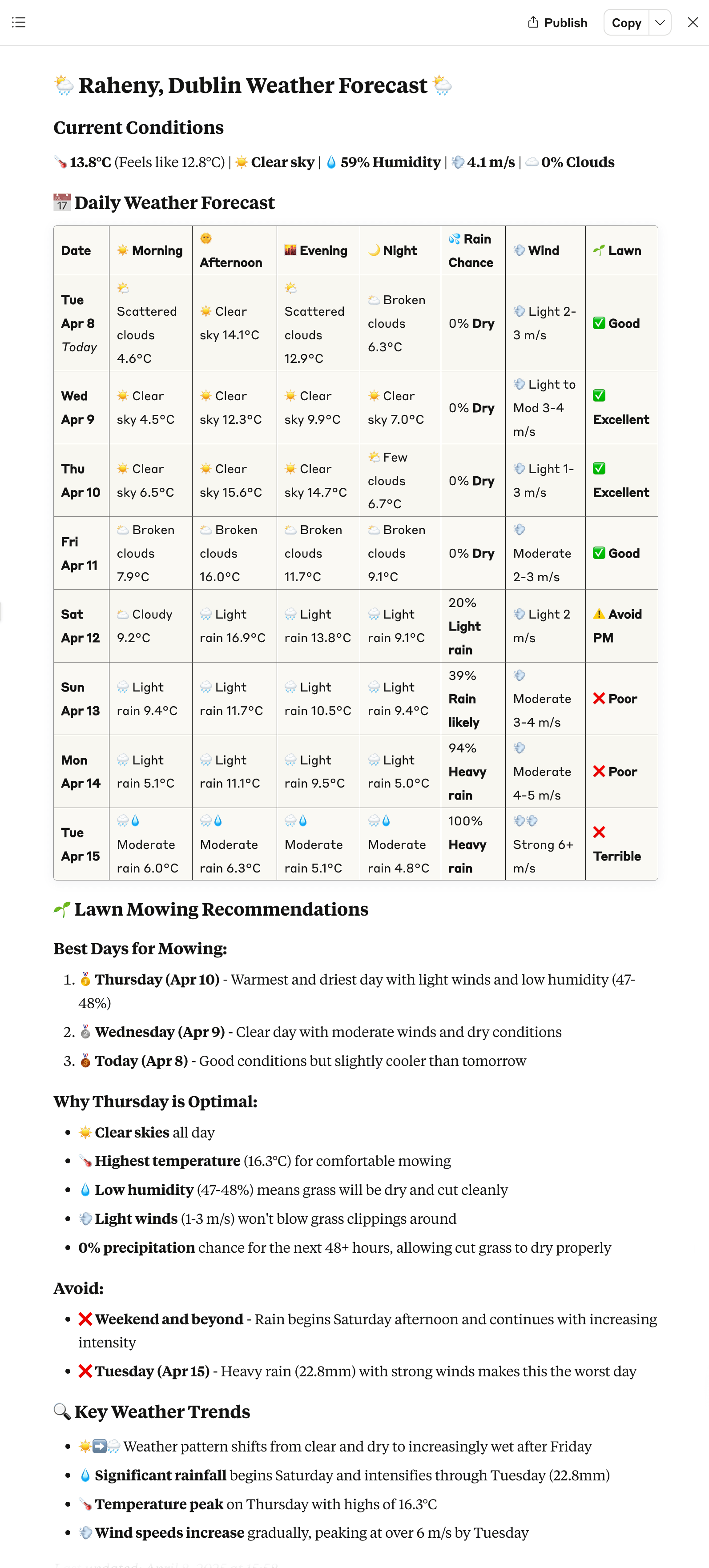
Claude Desktop showing a detailed weather forecast with lawn mowing recommendations
Features
- 🌍 Support for querying weather conditions anywhere in the world
- 🌤️ Hourly forecasts for the next 48 hours
- 📅 Provides detailed 8-day forecasts (today + following 7 days), with morning, afternoon, and evening data points
- 🌧️ Weather summaries and precipitation probabilities
- 🌡️ Detailed weather information including temperature, humidity, wind speed, etc.
- 📍 Support for reporting results in different time zones
- 🗂️ No separate configuration file needed; API key can be passed directly through environment variables or parameters
Usage
1. Get an OpenWeatherMap API Key with One Call API 3.0 Access (free)
- Visit OpenWeatherMap and register an account
- Subscribe to the “One Call API 3.0” plan (offers 1,000 API calls per day for free)
- Wait for API key activation (this can take up to an hour)
About the One Call API 3.0
The One Call API 3.0 provides comprehensive weather data:
- Current weather conditions
- Minute forecast for 1 hour
- Hourly forecast for 48 hours
- Daily forecast for 8 days (including today)
- National weather alerts
- Historical weather data
API Usage and Limits
- Free tier: 1,000 API calls per day
- Default limit: 2,000 API calls per day (can be adjusted in your account)
- Billing: Any calls beyond the free 1,000/day will be charged according to OpenWeatherMap pricing
- Usage cap: You can set a call limit in your account to prevent exceeding your budget (including capping your usage at the free tier limit so no costs can be incurred)
- If you reach your limit, you’ll receive a HTTP 429 error response
Note: API key activation can take several minutes up to an hour. If you receive authentication errors shortly after subscribing or generating a new key, wait a bit and try again later.
2. Clone the Repository and Install Dependencies
# Clone the repository
git clone https://github.com/rossshannon/weekly-weather-mcp.git
cd weekly-weather-mcp

# Create a virtual environment (recommended)
python3 -m venv venv
source venv/bin/activate  # Linux/Mac
# OR
venv\Scripts\activate  # Windows

# Install dependencies
pip3 install -r requirements.txt
This will install all the necessary dependencies to run the server and development tools.
3. Run the Server
There are two ways to provide the API key:
Method 1: Using Environment Variables
# Set environment variables
export OPENWEATHER_API_KEY="your_api_key"  # Linux/Mac
set OPENWEATHER_API_KEY=your_api_key  # Windows

# Run the server
python weather_mcp_server.py
Run directly without setting environment variables:
python weather_mcp_server.py
When calling the tool, you’ll need to provide the api_key parameter.
4. Use in MCP Client Configuration
Add the following configuration to your MCP-supported client (e.g., Claude Desktop (instructions), Cursor):
{
  "weather_forecast": {
    "command": "python3",
    "args": [
      "/full_path/weather_mcp_server.py"
    ],
    "env": {
      "OPENWEATHER_API_KEY": "your_openweathermap_key_here"
    },
    "disabled": false,
    "autoApprove": ["get_weather", "get_current_weather"]
  }
}
If you’re using a virtual environment, your configuration should include the full path to the Python executable in the virtual environment:
{
  "weather_forecast": {
    "command": "/full_path/venv/bin/python3",
    "args": [
      "/full_path/weather_mcp_server.py"
    ],
    "env": {
      "OPENWEATHER_API_KEY": "your_openweathermap_key_here"
    },
    "disabled": false,
    "autoApprove": ["get_weather", "get_current_weather"]
  }
}
The server exposes two tools, get_weather and get_current_weather. Both tools accept the same parameters:
location: Location name as a string, e.g., “Beijing”, “New York”, “Tokyo”. The tool will handle geocoding this to a latitude/longitude coordinate.api_key: OpenWeatherMap API key (optional, will read from environment variable if not provided)timezone_offset: Timezone offset in hours, e.g., 8 for Beijing, -4 for New York. Default is 0 (UTC time). Times in the returned data will be accurate for this timezone.
get_weather
Get comprehensive weather data for a location including current weather (next 48 hours) and 8-day forecast with detailed information.
Returns:
- Current weather information
- Hourly forecasts for the next 48 hours
- Daily forecasts for 8 days (today + 7 days ahead)
- Morning (9 AM), afternoon (3 PM), and evening (8 PM) data points for each day
- Weather summaries and precipitation probabilities
- Detailed weather information including temperature, humidity, wind speed, etc.
Perfect for use cases like:
- “🏃♂️ Which days this week should I go for a run?”
- “🪴 When’s the best evening to work in my garden this week?”
- “🪁 What’s the windiest day coming up soon for flying a kite?”
- “💧 Will I need to water my garden this week or will rain take care of it?”
get_current_weather
Get current weather for a specified location.
Returns:
- A simplified subset of the data returned by
get_weather
- Only the current weather information (temperature, feels like, weather condition, humidity, wind, etc.); no forecast data for future time periods
- Useful for quick queries about present conditions only
Location Lookup Details
The location parameter uses OpenWeatherMap’s geocoding to convert location names to geographic coordinates:
- Simple location names work: “Paris”, “Tokyo”, “New York”
- For better accuracy, include country codes: “Paris,FR”, “London,GB”, “Portland,US”
- For US cities, you can include state: “Portland,OR,US” or “Portland,ME,US”
- The API supports any location on Earth that OpenWeatherMap can geocode
- Location names are converted to latitude/longitude coordinates internally
If a location can’t be found, the API will return an error. In case of ambiguous locations, try adding country or state codes for more precise results.
Usage Examples
Example 1: Current Weather
User: What’s the weather like in New York right now?

AI: Let me check the current weather in New York for you.
[Calling get_current_weather("New York", timezone_offset=-4)]

Current weather in New York: 5°C, few clouds, humidity 42%, wind speed 4.1m/s.
Example 2: Weekly Planning
User: I need to mow my lawn this week in Boston. Which day would be best?

AI: Let me check the weather forecast for Boston to find the best day for lawn mowing.
[Calling get_weather("Boston", timezone_offset=-4)]

Looking at the Boston forecast for the week:
- Today (Monday): Light rain (28% chance), 5°C
- Tuesday: Clear, sunny, 10°C
- Wednesday: Light rain (100% chance), 9°C
- Thursday: Moderate rain (100% chance), 10°C
- Friday: Moderate rain (100% chance), 11°C
- Saturday: Partly cloudy, 13°C
- Sunday: Scattered clouds, 17°C

Tuesday would be your best option for mowing the lawn. It will be clear and sunny with no chance of rain, and the temperature will be comfortable at around 10°C.
You can combine this MCP server with others to achieve multi-step workflows. For example, once the weather has been checked, you can also tell Claude to add that as an event in your calendar to remind yourself of those plans.
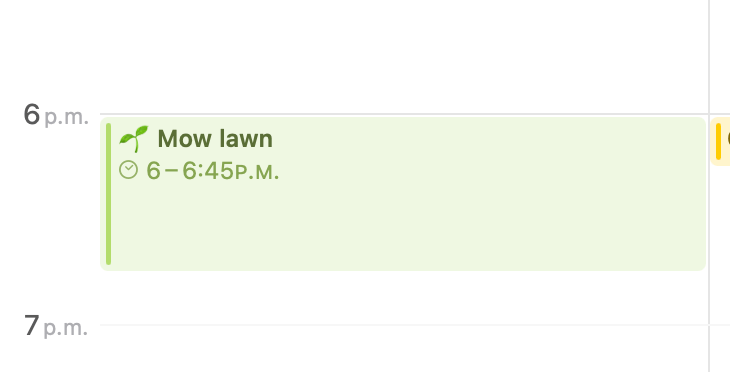
Calendar event created by Claude based on the weather forecast
Troubleshooting
API Key Issues
If you encounter an “Invalid API key” or authorization error:
- Make sure you’ve subscribed to the “One Call API 3.0” plan. You’ll need a debit or credit card to enable your account, but you’ll only be charged if you exceed the free tier limit.
- Remember that API key activation can take up to an hour
- Verify you have set the
OPENWEATHER_API_KEY correctly in environment variables, or check that you’re providing the correct api_key parameter when calling the tools
Other Common Issues
-
“Location not found” error:
- Check for typos in location names
- Some very small or remote locations might not be in OpenWeatherMap’s database
-
Incorrect location returned:
- Try using a more accurate city name or add a country code, e.g., “Beijing,CN” or “Porto,PT”
- For US cities with common names, specify the state: “Springfield,IL,US” or “Portland,OR,US”
- For cities with the same name in different countries, always include the country code and state if applicable: “Paris,FR” for Paris, France vs “Paris,TX,US” for Paris, Texas, USA.
-
Rate limiting (429 error): You’ve exceeded your API call limit. Check your OpenWeatherMap account settings.
Development and Testing
Testing
This project includes unit tests, integration tests, and mock client test files to validate the MCP server functionality. The server has been manually tested to ensure it works correctly with Claude Desktop, Cursor, and other MCP clients.
Manual Client Testing
Before configuring the server with Claude Desktop or other MCP clients, you can use the included test script to verify your API key and installation:
-
Set your OpenWeatherMap API key:
export OPENWEATHER_API_KEY="your_api_key"
-
Run the test client:
python3 test_mcp_client.py
The test script directly calls the weather functions to check the current weather in New York and displays the results. This helps verify that:
- Your API key is working properly
- The OpenWeatherMap API is accessible
- The weather data functions are operational
If the test shows current weather data, you’re ready to configure the server with Claude Desktop, Cursor, or other MCP clients!
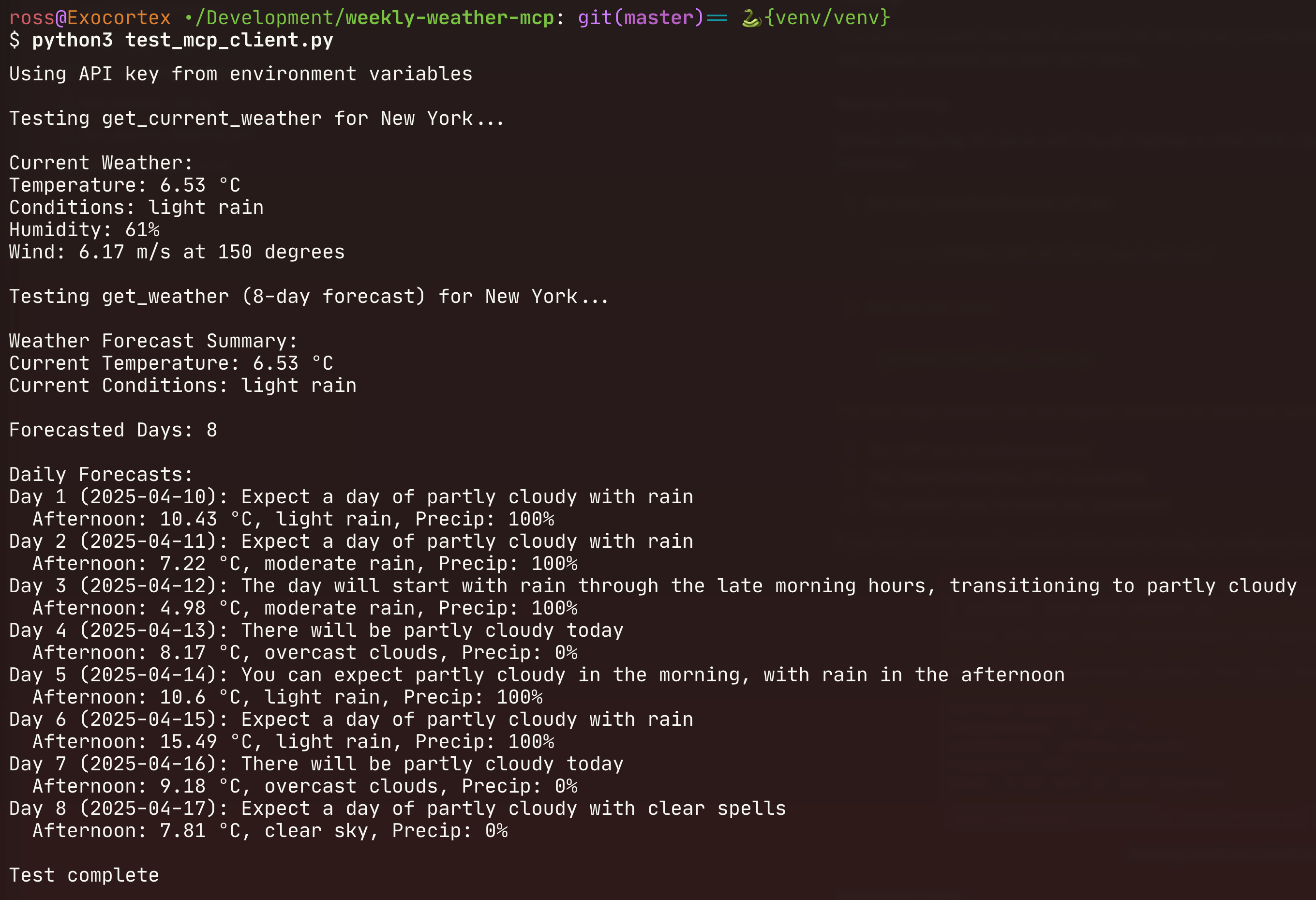
Running local test client to verify API key and installation
Automated Tests
The repository includes unit and integration test files that:
- Test API key handling and validation
- Validate data parsing and formatting
- Verify error handling for API failures
- Test both exposed MCP tools:
get_weather and get_current_weather
These tests require proper setup of the development environment with all dependencies installed. They’re provided as reference for future development.
To run the automated tests:
# Run unit tests
python test_weather_mcp.py

# Run integration tests
python test_mcp_integration.py
The tests use a sample API response (test_weather_response.json) to simulate responses from the OpenWeatherMap API, so they can be run without an API key or internet connection.
These tests are provided as reference for future development and to ensure the MCP server continues to function correctly after any modifications.
Credits
This project is adapted from an original Weather MCP by Zippland. The modifications include:
- Integration with OpenWeatherMap One Call API 3.0
- Extended forecast data from 2 days to 8 days (today + 7 days)
- Addition of morning, afternoon and evening data points for each day
- Hourly forecasts for the next 48 hours
- Inclusion of weather summaries, wind speed, and precipitation probabilities
- Unit tests, integration tests, and mock client test files



