
An AI receptionist platform with an MCP server for accessing business calls, contacts and appointments from AI assistants.
52
Communication
An MCP server that connects to a personal WhatsApp account, enabling an AI agent to search and read messages, search contacts, and send messages and media.
WhatsApp MCP Server is cataloged as an MCP server attributed to lharries. An MCP server that connects to a personal WhatsApp account, enabling an AI agent to search and read messages, search contacts, and send messages and media. It is categorized under communication social. See the capability inspector for recorded interfaces and their independent review status; consult upstream documentation for the current interface.
Installation configuration is not reviewed. No executable setup is offered for this entry; inspect the source repository before proceeding.
Catalog license label: Not specified. Check the source repository's current license and terms before using, modifying or distributing this software.
能力定义尚未审核。未核验的采集内容不会作为可信接口展示。
暂无可展示的已审核记录。这不表示上游不支持此能力。
暂无可展示的已审核记录。这不表示上游不支持此能力。
暂无可展示的已审核记录。这不表示上游不支持此能力。
Email delivery is not connected. This page does not collect email addresses or create subscriptions.
Browse the registry for current listings instead.
Reviews for WhatsApp MCP Server are not available yet
Review publishing and storage are not connected. This page does not collect or publish ratings or comments, including after sign-in.
Message history is stored locally in a SQLite database and only sent to an LLM when the agent accesses it through tools.
It connects to a personal WhatsApp account via the WhatsApp web multidevice API using the whatsmeow library.
FFmpeg is optional and only needed for audio messages; without it, raw audio can still be sent with send_file but won't be playable voice messages.
README.md · 7d6a06dcdce1 · 采集于 2026-11-13 09:42:52 UTC
保留上游原文,不做 AI 改写。为安全起见过滤脚本、表单和不安全链接。
当前显示最后一次成功采集的文档快照,请以来源页面为准。
This is a Model Context Protocol (MCP) server for WhatsApp.
With this you can search and read your personal Whatsapp messages (including images, videos, documents, and audio messages), search your contacts and send messages to either individuals or groups. You can also send media files including images, videos, documents, and audio messages.
It connects to your personal WhatsApp account directly via the Whatsapp web multidevice API (using the whatsmeow library). All your messages are stored locally in a SQLite database and only sent to an LLM (such as Claude) when the agent accesses them through tools (which you control).
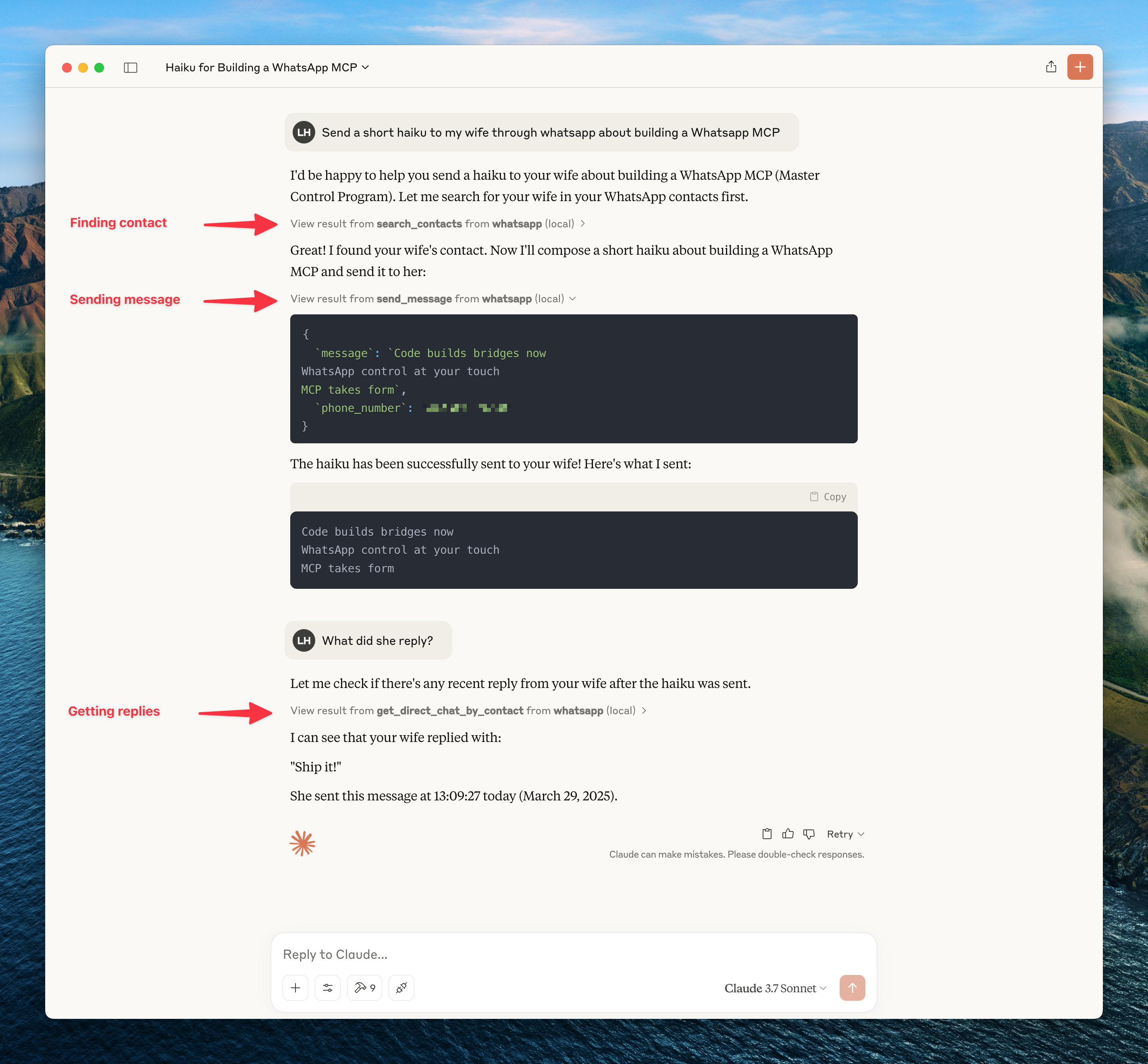
Here's an example of what you can do when it's connected to Claude.
To get updates on this and other projects I work on enter your email here
Caution: as with many MCP servers, the WhatsApp MCP is subject to the lethal trifecta. This means that project injection could lead to private data exfiltration.
curl -LsSf https://astral.sh/uv/install.sh | sh.ogg Opus format. With FFmpeg installed, the MCP server will automatically convert non-Opus audio files. Without FFmpeg, you can still send raw audio files using the send_file tool.Clone this repository
git clone https://github.com/lharries/whatsapp-mcp.git
cd whatsapp-mcp
Run the WhatsApp bridge
Navigate to the whatsapp-bridge directory and run the Go application:
cd whatsapp-bridge
go run main.go
The first time you run it, you will be prompted to scan a QR code. Scan the QR code with your WhatsApp mobile app to authenticate.
After approximately 20 days, you will might need to re-authenticate.
Connect to the MCP server
Copy the below json with the appropriate {{PATH}} values:
{
  "mcpServers": {
    "whatsapp": {
      "command": "{{PATH_TO_UV}}", // Run `which uv` and place the output here
      "args": [
        "--directory",
        "{{PATH_TO_SRC}}/whatsapp-mcp/whatsapp-mcp-server", // cd into the repo, run `pwd` and enter the output here + "/whatsapp-mcp-server"
        "run",
        "main.py"
      ]
    }
  }
}
For Claude, save this as claude_desktop_config.json in your Claude Desktop configuration directory at:
~/Library/Application Support/Claude/claude_desktop_config.json
For Cursor, save this as mcp.json in your Cursor configuration directory at:
~/.cursor/mcp.json
Restart Claude Desktop / Cursor
Open Claude Desktop and you should now see WhatsApp as an available integration.
Or restart Cursor.
If you're running this project on Windows, be aware that go-sqlite3 requires CGO to be enabled in order to compile and work properly. By default, CGO is disabled on Windows, so you need to explicitly enable it and have a C compiler installed.
Install a C compiler
We recommend using MSYS2 to install a C compiler for Windows. After installing MSYS2, make sure to add the ucrt64\bin folder to your PATH.
→ A step-by-step guide is available here.
Enable CGO and run the app
cd whatsapp-bridge
go env -w CGO_ENABLED=1
go run main.go
Without this setup, you'll likely run into errors like:
Binary was compiled with 'CGO_ENABLED=0', go-sqlite3 requires cgo to work.
This application consists of two main components:
Go WhatsApp Bridge (whatsapp-bridge/): A Go application that connects to WhatsApp's web API, handles authentication via QR code, and stores message history in SQLite. It serves as the bridge between WhatsApp and the MCP server.
Python MCP Server (whatsapp-mcp-server/): A Python server implementing the Model Context Protocol (MCP), which provides standardized tools for Claude to interact with WhatsApp data and send/receive messages.
whatsapp-bridge/store/ directoryOnce connected, you can interact with your WhatsApp contacts through Claude, leveraging Claude's AI capabilities in your WhatsApp conversations.
Claude can access the following tools to interact with WhatsApp:
The MCP server supports both sending and receiving various media types:
You can send various media types to your WhatsApp contacts:
send_file tool to share any supported media type.send_audio_message tool to send audio files as playable WhatsApp voice messages.
.ogg Opus format.send_file tool, but they won't appear as playable voice messages.By default, just the metadata of the media is stored in the local database. The message will indicate that media was sent. To access this media you need to use the download_media tool which takes the message_id and chat_jid (which are shown when printing messages containing the meda), this downloads the media and then returns the file path which can be then opened or passed to another tool.
whatsapp-bridge/store/messages.db and whatsapp-bridge/store/whatsapp.db) and restart the bridge to re-authenticate.For additional Claude Desktop integration troubleshooting, see the MCP documentation. The documentation includes helpful tips for checking logs and resolving common issues.
Claim this server with your GitHub account to request manual ownership verification.
Link to the catalog listing for WhatsApp MCP Server from your README. This badge does not certify ownership, compatibility or security.
[](https://awesome-mcp.com/servers/whatsapp-mcp)Public repository statistics could not be verified. Check the configured source address; unavailable counts are not zero.
来源、范围和时段分别列出;不相加,不代表安装人数、活跃用户或安全审核。
尚无已审核的包 / 镜像标识,暂不展示下载统计。
Alternative and complementary servers in the same category
An AI receptionist platform with an MCP server for accessing business calls, contacts and appointments from AI assistants.
Pidgeon provides an MCP server and an email inbox API that gives AI agents their own addresses for sending, awaiting, and replying to email.

A Telegram CLI with background sync that can run an optional MCP server for a personal account using MTProto, not the bot API.
