
A directory listing describing a cancellation-letter and mailing-address service. The configured public GitHub repository returned 404 during source verification.
Repository stats unavailable
Developer Tools
An MCP server that adds domain expertise in 12V / 24V / 48V electrical systems, sizing battery banks, selecting wire gauges and fuses, and generating wiring diagrams for boats, campers and off-grid builds.
VoltPlan Wiring Diagrams MCP Server is cataloged as an MCP server attributed to yuzu-hub. An MCP server that adds domain expertise in 12V / 24V / 48V electrical systems, sizing battery banks, selecting wire gauges and fuses, and generating wiring diagrams for boats, campers and off-grid builds. It is categorized under developer tools. See the capability inspector for recorded interfaces and their independent review status; consult upstream documentation for the current interface.
Installation configuration is not reviewed. No executable setup is offered for this entry; inspect the source repository before proceeding.
Catalog license label: MIT. Check the source repository's current license and terms before using, modifying or distributing this software.
能力定义尚未审核。未核验的采集内容不会作为可信接口展示。
暂无可展示的已审核记录。这不表示上游不支持此能力。
暂无可展示的已审核记录。这不表示上游不支持此能力。
暂无可展示的已审核记录。这不表示上游不支持此能力。
Email delivery is not connected. This page does not collect email addresses or create subscriptions.
Browse the registry for current listings instead.
Reviews for VoltPlan Wiring Diagrams MCP Server are not available yet
Review publishing and storage are not connected. This page does not collect or publish ratings or comments, including after sign-in.
Yes; the README describes building and starting a self-hosted HTTP server that listens on a local port.
It sends anonymous usage events to VoltPlan's cookieless analytics, and telemetry can be disabled.
Yes; a clean endpoint offers the same tools without buy links or pointers to other VoltPlan pages.
README.md · 8ad5424b4497 · 采集于 2026-11-13 11:21:21 UTC
保留上游原文,不做 AI 改写。为安全起见过滤脚本、表单和不安全链接。
当前显示最后一次成功采集的文档快照,请以来源页面为准。
I refit my boat with Claude as the electrician. Here's the MCP that made it possible.
An MCP server that gives Claude (or any MCP-compatible AI) domain expertise in 12V / 24V / 48V electrical systems — sizing the bank, picking the wire gauge, recommending the fuse, and generating a complete wiring diagram. For boats, campers, vans, and off-grid builds.




{ "mcpServers": { "wiring-diagram": { "url": "https://mcp.voltplan.app/mcp" } } }
Drop that into your claude_desktop_config.json, restart Claude, ask: "Plan a 400 Ah lithium house bank for a 30 ft sailboat with 2 days of autonomy." Done.
Built while refitting Largo, a 1996 Maxum, in Roermond. The math kept getting in the way of the work — sizing the bank, then the gauge, then the fuse, then redoing all of it after one load changed. So I gave Claude the math. Now it sizes the bank, picks the gauge, and generates the diagram. I'd rather just do the cabling.
The calculations are the same ones any cruiser or vanlifer ends up doing on graph paper at 11pm. This server makes them a one-sentence prompt.
Eleven tools, all callable by name from any MCP client:
| Tool | What it does |
|---|---|
calculate_power_budget | Daily energy draw from a list of loads (Wh, Ah, peak power) |
calculate_battery_bank | Bank size for given consumption + autonomy + DoD |
calculate_battery_config | Series/parallel arrangement to hit a target voltage and capacity |
calculate_solar_size | Panel wattage to recharge daily, accounting for sun hours and losses |
calculate_wire_gauge | AWG / mm² for current and run length, with fuse recommendation |
calculate_inverter_size | Inverter wattage for AC loads, with surge headroom and DC current draw |
calculate_charging_time | Time from X% to Y% SoC, with bulk and absorption phases |
generate_wiring_diagram | Complete schematic as an image (PNG, default) or icon-free SVG, auto-fused and protected, plus a link that opens the system in the VoltPlan editor |
list_component_types | Component reference and example configs for diagram building |
find_components | Real products from VoltPlan's curated catalogue that match a spec (category, system voltage, watts, Ah/Wh, pure sine), closest rating first, with product page and buy links |
build_bom | Shopping list for the same system the diagram takes: components with matching catalogue products, cable per gauge with lengths, fuses, fuse holders, terminals and tools, sized like the diagram |
Three real prompts, three real outputs.
"Plan a 400 Ah lithium house bank for a 30 ft sailboat. Loads: 12V fridge 24/7 (60W), LED nav and cabin lights (25W, 4h/day), USB chargers (30W, 2h/day), occasional inverter for a laptop (90W, 3h/day). 2 days of autonomy without solar, LiFePO4 with 80% DoD."
Claude calls calculate_power_budget then calculate_battery_bank:
Total daily energy: 1,870 Wh/day  (155.8 Ah/day at 12V)
Peak load:           205 W        (17.1 A)

Required capacity (2 days × 80% DoD):  4,675 Wh / 389.6 Ah
Recommended bank: 4 × 100 Ah / 12.8 V LiFePO4 in parallel (4P)
Total / usable:   400 Ah / 5,120 Wh   →   4,096 Wh usable
                  ≈ 2.2 days of autonomy
"What gauge wire for a 50A inverter run, 3 meters one-way, 12V, marine environment, max 3% drop?"
Claude calls calculate_wire_gauge:
Recommended cable:    16 mm² (6 AWG)   — rated 65 A
Voltage drop:         0.34 V (2.80%)   ✓ within target
Total resistance:     6.7 mΩ
Power lost as heat:   16.8 W
Fuse:                 70 A ANL bolt-down, within 18 cm of battery+

Status: OK — wire size meets all requirements.
(Ampacity alone would allow 10 mm² / 8 AWG, but voltage drop drives the choice up at this length.)
"Generate a wiring diagram for: 2 × 100W solar → MPPT → 200 Ah LiFePO4 → BMV-712 monitor → main 12V bus → fridge, lights, USB."
Claude calls generate_wiring_diagram and shows the schematic as an image: batteries with terminals, MPPT charger, auto-generated shunt, main switch, low-voltage cutoff, and fused load lines in red/black with computed gauges. Below it comes a link that opens the system in the VoltPlan editor with the battery, the solar panel and the first load already placed, to finish, save and turn into a shopping list.
Loads need only power or current, batteries only capacityAh or energyWh; the server derives the rest, and voltages default to the first battery's.
See examples/ for five fully-worked scenarios — sailboat refit, Sprinter van, off-grid cabin, day sailer, live-aboard — each with the prompt, the expected tool calls, and the resulting numbers.
Edit claude_desktop_config.json (Settings → Developer → Edit Config):
{
  "mcpServers": {
    "wiring-diagram": {
      "url": "https://mcp.voltplan.app/mcp"
    }
  }
}
Restart Claude. The hammer icon in the chat input means tools are active.
{
  "mcpServers": {
    "wiring-diagram": {
      "command": "npx",
      "args": ["wiring-diagram-mcp"]
    }
  }
}
# hosted
claude mcp add wiring-diagram --transport http https://mcp.voltplan.app/mcp

# local
claude mcp add wiring-diagram -- npx wiring-diagram-mcp
Edit ~/.cursor/mcp.json (or .cursor/mcp.json per-project):
{
  "mcpServers": {
    "wiring-diagram": {
      "url": "https://mcp.voltplan.app/mcp"
    }
  }
}
Open the Cline panel → MCP Servers → Edit MCP Settings, then:
{
  "mcpServers": {
    "wiring-diagram": {
      "url": "https://mcp.voltplan.app/mcp"
    }
  }
}
npm install
npm run build
npm run start:http   # listens on http://localhost:3001/mcp
| Env var | Default | Purpose |
|---|---|---|
VOLTPLAN_API_URL | https://voltplan.app | VoltPlan instance for diagram rendering, catalogue matches (find_components) and shopping lists (build_bom) |
VOLTPLAN_PB_URL | https://base.voltplan.app | VoltPlan catalogue (public, read-only) for curated cable and fuse links |
VOLTPLAN_TELEMETRY | on | off disables the usage events described under Telemetry |
PORT | 3001 | HTTP server port |
docker build -t wiring-diagram-mcp .
docker run -p 3001:3001 wiring-diagram-mcp
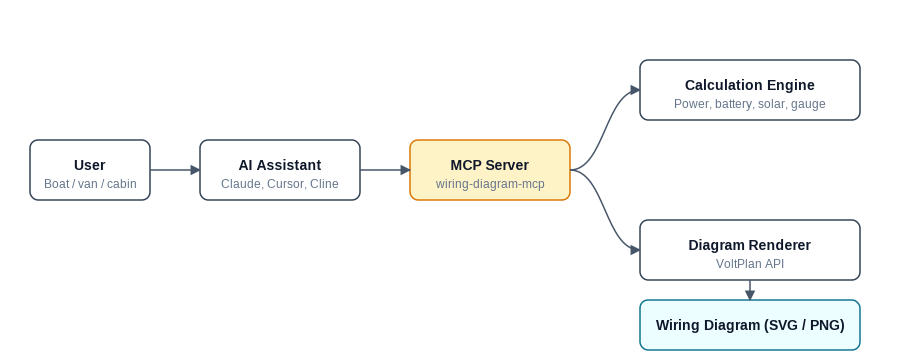
Calculations run inside the MCP server and are deterministic. Diagram rendering hits the VoltPlan API and returns a PNG (or SVG) that the AI client shows in the chat. find_components and build_bom call VoltPlan's public /api/components/match and /api/diagram/bom endpoints; the shopping list is sized by the same code that renders the diagram. calculate_wire_gauge additionally reads VoltPlan's public catalogue (cached for an hour) to link the recommended cable and fuse to a curated product; without it the links fall back to a store search.
Buy links go through voltplan.app/api/go with source=mcp, which picks the reader's local Amazon store; VoltPlan earns a commission on purchases (Amazon Associate). Links to voltplan.app pages carry utm_source=mcp.
https://mcp.voltplan.app/mcp-clean serves the same tools without buy links and without pointers to other VoltPlan pages (tool descriptions included). Use it where tool output must not carry promotional content, e.g. Anthropic's connector directory. The diagram's editor link stays, because it opens the generated system for editing. find_components and build_bom return no links at all there: product names, specs, quantities and ratings only.
The server sends anonymous usage events to VoltPlan's cookieless analytics (Umami): connection handshakes and tool calls, with the tool name, a few coarse inputs (system voltage, output format, product category) and the client's product name (e.g. claude-ai, from the MCP clientInfo or the HTTP User-Agent). No prompts, no tool arguments beyond those, no IP-derived identifiers. Events record the endpoint as their page (/mcp or /mcp-clean). Set VOLTPLAN_TELEMETRY=off to disable it.
Worked scenarios in examples/:
Built by Stefan Lange-Hegermann (yuzuhub.com). Powered by VoltPlan.
Issues, ideas, and pull requests welcome on GitHub.
MIT — see LICENSE.
Claim this server with your GitHub account to request manual ownership verification.
Link to the catalog listing for VoltPlan Wiring Diagrams MCP Server from your README. This badge does not certify ownership, compatibility or security.
[](https://awesome-mcp.com/servers/wiring-diagram-mcp)Public repository statistics could not be verified. Check the configured source address; unavailable counts are not zero.
来源、范围和时段分别列出;不相加,不代表安装人数、活跃用户或安全审核。
尚无已审核的包 / 镜像标识,暂不展示下载统计。
Alternative and complementary servers in the same category
A directory listing describing a cancellation-letter and mailing-address service. The configured public GitHub repository returned 404 during source verification.

A hosted MCP service for browsing and searching through Singapore mobile-network proxies.

A directory listing describing a Markdown-to-PDF service. The configured public GitHub repository returned 404 during source verification.