
Oleafly is a live collaborative LaTeX, Typst and Markdown editor for research that offers a local MCP server and an oleafly mcp stdio command so outside AI clients can use its project tools.
Repository stats unavailable
Productivity & Ops
A Model Context Protocol server that brings Withings health data into Claude, covering sleep, body measurements, workouts, and heart data.
Withings MCP Server is cataloged as an MCP server attributed to akutishevsky. A Model Context Protocol server that brings Withings health data into Claude, covering sleep, body measurements, workouts, and heart data. It is categorized under productivity work. See the capability inspector for recorded interfaces and their independent review status; consult upstream documentation for the current interface.
Installation configuration is not reviewed. No executable setup is offered for this entry; inspect the source repository before proceeding.
Catalog license label: MIT License. Check the source repository's current license and terms before using, modifying or distributing this software.
能力定义尚未审核。未核验的采集内容不会作为可信接口展示。
暂无可展示的已审核记录。这不表示上游不支持此能力。
暂无可展示的已审核记录。这不表示上游不支持此能力。
暂无可展示的已审核记录。这不表示上游不支持此能力。
Email delivery is not connected. This page does not collect email addresses or create subscriptions.
Browse the registry for current listings instead.
Reviews for Withings MCP Server are not available yet
Review publishing and storage are not connected. This page does not collect or publish ratings or comments, including after sign-in.
Yes, a hosted server is available for end users who want to use it without hosting anything themselves, connecting via a remote MCP server URL.
Access tokens, refresh tokens, and authorization codes are encrypted at rest using AES-256-GCM with PBKDF2 key derivation.
The server can list ECG recordings and retrieve detailed ECG waveform data.
README.md · a7f78f52dec8 · 采集于 2026-11-13 12:28:47 UTC
保留上游原文,不做 AI 改写。为安全起见过滤脚本、表单和不安全链接。
当前显示最后一次成功采集的文档快照,请以来源页面为准。
Help me pay for the servers on Patreon
A Model Context Protocol (MCP) server that brings your Withings health data into Claude. Access your sleep patterns, body measurements, workouts, heart data, and more through natural conversation.
🔒 Privacy First: This is my personal project, and the repository is intentionally public to demonstrate transparency. The code shows that no personal information is logged or stored maliciously. All sensitive data (tokens, user IDs) is encrypted at rest and automatically redacted from logs. You can review the entire codebase to verify this commitment to privacy.
⚠️ Disclaimer: This server is provided as-is without any guarantees or warranties. While I've made every effort to ensure security and privacy, I make no guarantees about availability, data integrity, or security. Use at your own risk. For production use cases, consider self-hosting your own instance.
https://withings-mcp.com/mcp → click AddThat's it! Ask Claude about your sleep, weight, workouts, or heart data.
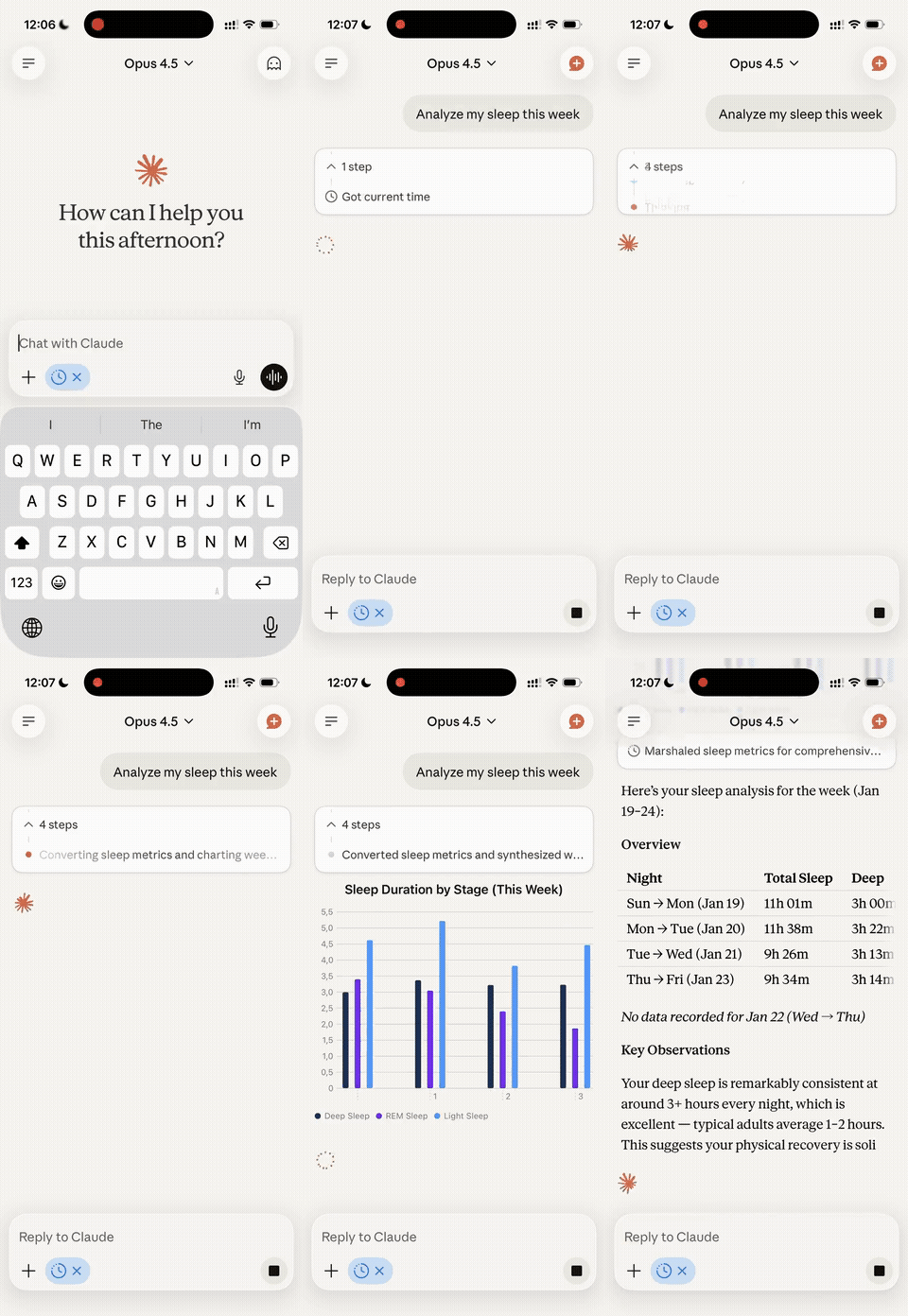
This MCP server gives Claude access to your Withings health data, allowing you to:
All through natural conversation with Claude or any other MCP-compatible client.
If you just want to use this MCP server with Claude Desktop without hosting anything yourself, follow these steps:
Withings (or any name you prefer)https://withings-mcp.com/mcpNote: If your MCP client doesn't support UI-based connector configuration, you can manually edit the config file instead. See the manual configuration guide below.
After authorization, Claude will have access to your Withings data!
Once connected, Claude can use these tools to access your data:
get_hrv - Minute-level RMSSD, SDNN, and quality scores captured during sleepget_sleep_summary - Sleep duration, stages (light/deep/REM), heart rate, breathing, sleep scoreget_activity - Daily steps, distance, calories, elevation, activity durationsget_intraday_activity - High-frequency activity data throughout the dayget_workouts - Detailed workout summaries with heart rate zones and metricsget_measures - Weight, body composition, blood pressure, heart rate, temperature, VO2 max, and moreget_user_devices - List of connected Withings devicesget_user_goals - Your health and fitness goals (steps, sleep, weight)list_heart_records - List of ECG recordingsget_heart_signal - Detailed ECG waveform datalist_stetho_records - List of stethoscope recordingsget_stetho_signal - Detailed audio signal dataTry asking Claude:
Want to run your own instance? Here's how to deploy this MCP server yourself.
https://your-domain.com/callback
The hosted version includes a Google Analytics tag (G-ZMGF9WXL3W) in the static pages under public/. If you're forking this repo, remove or replace the GA snippet in public/index.html and public/health.html, and update the CSP headers in src/server/app.ts accordingly.
# Clone the repository
git clone https://github.com/your-username/withings-mcp.git
cd withings-mcp

# Install dependencies
bun install

# Generate encryption secret
bun run generate-secret
# Copy the output - you'll need it for environment variables
bun install -g supabase (or use brew install supabase/tap/supabase)supabase link --project-ref <your-project-ref>supabase db pushSUPABASE_URLSUPABASE_SECRET_KEYNote: Withings requires a publicly accessible URL for OAuth callbacks. For local development, use a tunneling service to expose your local server or deploy to a staging environment for testing.
# Copy environment template
cp .env.example .env

# Edit .env with your values
# WITHINGS_CLIENT_ID=your_client_id
# WITHINGS_CLIENT_SECRET=your_client_secret
# WITHINGS_REDIRECT_URI=https://your-tunnel-url.com/callback
# ENCRYPTION_SECRET=paste_generated_secret_here
# SUPABASE_URL=https://your-project.supabase.co
# SUPABASE_SECRET_KEY=your_service_role_key
# PORT=3000

# Run locally (Bun executes TypeScript directly — no build step)
bun run dev
Make sure your redirect URI in the .env file matches the publicly accessible URL pointing to your local server.
# The project runs TypeScript directly with Bun — no build step required.
bun run start
Deploy to DigitalOcean App Platform (its Bun buildpack detects package.json and runs bun run start automatically), or any other host that supports Bun.
Set the following environment variables on your hosting platform:
| Variable | Required | Example |
|---|---|---|
WITHINGS_CLIENT_ID | Yes | your_client_id |
WITHINGS_CLIENT_SECRET | Yes | your_client_secret |
WITHINGS_REDIRECT_URI | Yes | https://your-domain.com/callback |
ENCRYPTION_SECRET | Yes | Generated from step 2 |
SUPABASE_URL | Yes | https://your-project.supabase.co |
SUPABASE_SECRET_KEY | Yes | Your Supabase service role key |
PORT | No | 3000 (or your platform's default) |
LOG_LEVEL | No | info |
ALLOWED_ORIGINS | No | https://example.com,https://app.example.com |
Go back to your Withings developer app and update the redirect URI to match your deployed URL:
https://your-domain.com/callback
Withings (or any name you prefer)https://your-domain.com/mcpConfigure your MCP client with the following connection details:
https://your-domain.com/mcp/.well-known/oauth-authorization-server| Variable | Required | Description |
|---|---|---|
WITHINGS_CLIENT_ID | Yes | Your Withings app client ID |
WITHINGS_CLIENT_SECRET | Yes | Your Withings app client secret |
WITHINGS_REDIRECT_URI | Yes | OAuth callback URL (must match Withings app settings) |
ENCRYPTION_SECRET | Yes | 32+ character secret for token encryption (generate with bun run generate-secret) |
SUPABASE_URL | Yes | Your Supabase project URL (from Dashboard → Settings → API) |
SUPABASE_SECRET_KEY | Yes | Your Supabase service role key (from Dashboard → Settings → API) |
PORT | No | Server port (default: 3000) |
LOG_LEVEL | No | Logging level: trace, debug, info, warn, error (default: info) |
ALLOWED_ORIGINS | No | Comma-separated list of allowed CORS origins for browser clients |
bun run start            # Run the server
bun run dev              # Hot-reload mode
bun run typecheck        # Type-check with tsc (no emit)
bun run build            # Bundle for production (outputs to ./build)
bun run generate-secret  # Generate encryption secret for ENCRYPTION_SECRET env variable
src/
├── auth/              # OAuth 2.0 authentication & token storage
├── db/                # Supabase client & cleanup scheduler
├── server/            # Hono app, MCP endpoints, middleware
├── tools/             # MCP tools for Withings API (sleep, measure, user, heart, stetho)
├── types/             # TypeScript type definitions (Hono, Withings API)
├── withings/          # Withings API client
├── utils/             # Logger and encryption utilities
└── index.ts           # Main entry point

supabase/
└── migrations/        # Database schema migrations
See CLAUDE.md for detailed architecture documentation.
All Withings access tokens, refresh tokens, and authorization codes are encrypted at rest using AES-256-GCM:
Important: Keep your ENCRYPTION_SECRET:
bun run generate-secret)/authorize endpoint validates redirect_uri against the registered client's allowed URIs, preventing open redirect attacksunsafe-inline directivesThe custom logger automatically redacts all sensitive information:
You can review the logging implementation in src/utils/logger.ts.
This is a personal project, but contributions are welcome! Please:
MIT License - see LICENSE file for details.
Built with:
Claim this server with your GitHub account to request manual ownership verification.
Link to the catalog listing for Withings MCP Server from your README. This badge does not certify ownership, compatibility or security.
[](https://awesome-mcp.com/servers/withings-mcp)Public repository statistics could not be verified. Check the configured source address; unavailable counts are not zero.
来源、范围和时段分别列出;不相加,不代表安装人数、活跃用户或安全审核。
尚无已审核的包 / 镜像标识,暂不展示下载统计。
Alternative and complementary servers in the same category
Oleafly is a live collaborative LaTeX, Typst and Markdown editor for research that offers a local MCP server and an oleafly mcp stdio command so outside AI clients can use its project tools.
Buddy is an Android app that offers its phone tools through a local MCP server to Claude Code, Codex, OpenCode, Antigravity, and Grok sessions.

Tuqui is a hosted MCP server that connects Odoo with Claude and ChatGPT so users can ask about sales, stock, customers and overdue invoices in plain language.
