
This is a Model Context Protocol (MCP) server for interacting with AIStor object stores.
Repository stats unavailable
Databases & Storage
An MCP server that turns natural language into SQL and returns query results from MySQL or PostgreSQL databases.
XiYan MCP Server is cataloged as an MCP server attributed to xgenerationlab. An MCP server that turns natural language into SQL and returns query results from MySQL or PostgreSQL databases. It is categorized under databases storage. See the capability inspector for recorded interfaces and their independent review status; consult upstream documentation for the current interface.
Installation configuration is not reviewed. No executable setup is offered for this entry; inspect the source repository before proceeding.
Catalog license label: Apache 2.0. Check the source repository's current license and terms before using, modifying or distributing this software.
能力定义尚未审核。未核验的采集内容不会作为可信接口展示。
暂无可展示的已审核记录。这不表示上游不支持此能力。
暂无可展示的已审核记录。这不表示上游不支持此能力。
暂无可展示的已审核记录。这不表示上游不支持此能力。
Email delivery is not connected. This page does not collect email addresses or create subscriptions.
Browse the registry for current listings instead.
Reviews for XiYan MCP Server are not available yet
Review publishing and storage are not connected. This page does not collect or publish ratings or comments, including after sign-in.
Yes, the server supports a local mode that runs without an API key and is described as more secure.
It can use stdio or SSE transport.
README.md · 7d3ee1caab60 · 采集于 2026-11-13 09:34:57 UTC
保留上游原文,不做 AI 改写。为安全起见过滤脚本、表单和不安全链接。
当前显示最后一次成功采集的文档快照,请以来源页面为准。

A Model Context Protocol (MCP) server that enables natural language queries to databases
powered by XiYan-SQL, SOTA of text-to-sql on open benchmarks
💻 XiYan-mcp-server |
🌐 XiYan-SQL |
📖 Arxiv |
🏆 XiYanSQL Model |
📄 PapersWithCode
🤗 HuggingFace |
🤖 ModelScope |
🌕 析言GBI




English | 中文 | 日本語
Ding Group钉钉群|
Follow me on Weibo
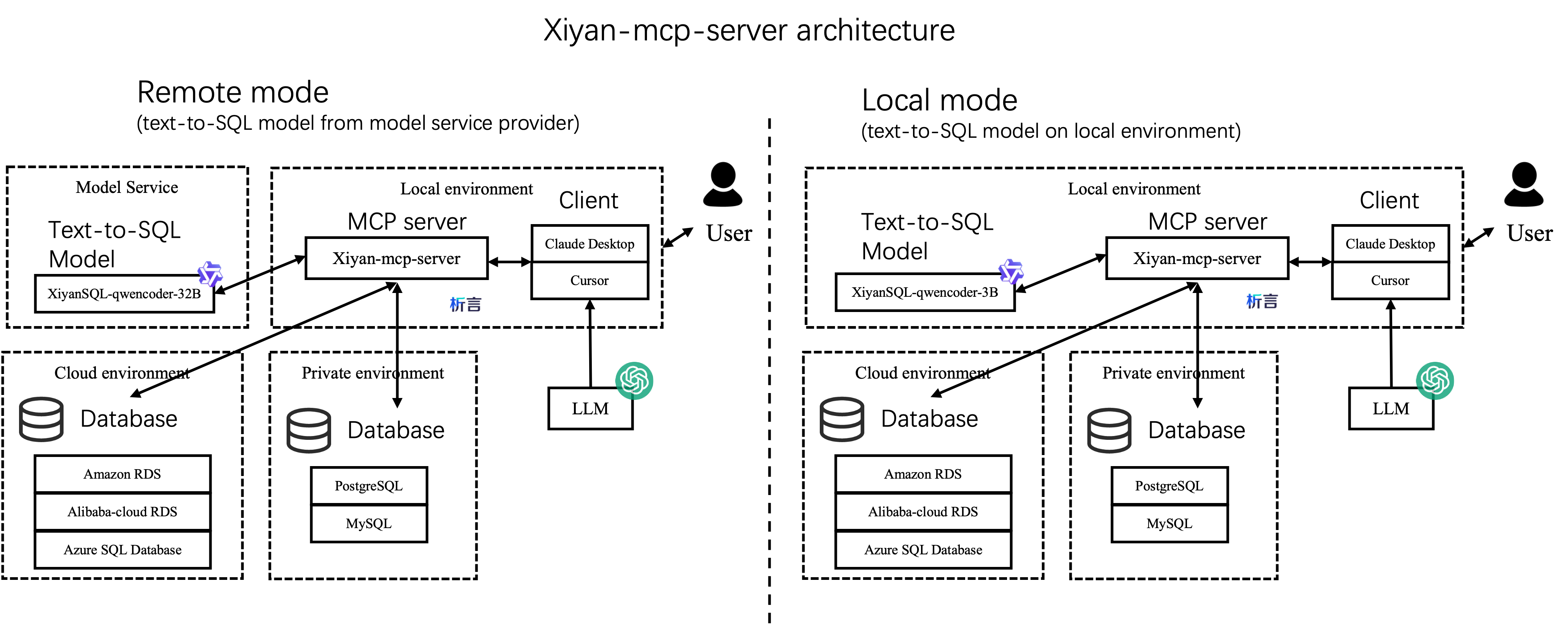
There are two ways to integrate this server in your project, as shown below: The left is remote mode, which is the default mode. It requires an API key to access the xiyanSQL-qwencoder-32B model from service provider (see Configuration). Another mode is local mode, which is more secure. It does not require the API key.
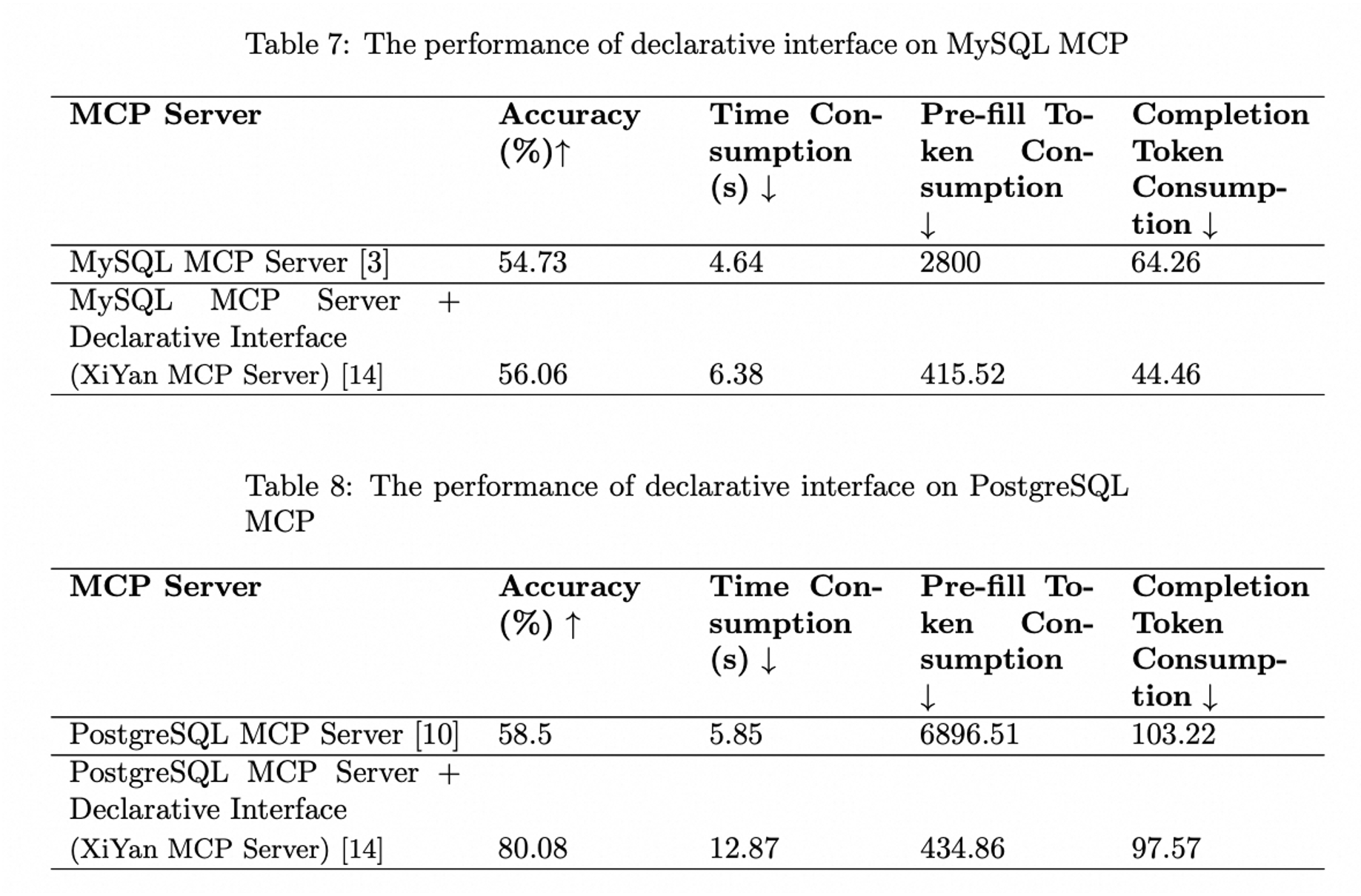
The following figure illustrates the performance of the XiYan MCP server as measured by the MCPBench benchmark. The XiYan MCP server demonstrates superior performance compared to both the MySQL MCP server and the PostgreSQL MCP server, achieving a lead of 2-22 percentage points. The detailed experiment results can be found at MCPBench and the report "Evaluation Report on MCP Servers".
The tool get_data provides a natural language interface for retrieving data from a database. This server will convert the input natural language into SQL using a built-in model and call the database to return the query results.
The {dialect}://{table_name} resource allows obtaining a portion of sample data from the database for model reference when a specific table_name is specified.
The {dialect}:// resource will list the names of the current databases
Python 3.11+ is required. You can install the server through pip, and it will install the latest version:
pip install xiyan-mcp-server
If you want to install the development version from source, you can install from source code on github:
pip install git+https://github.com/XGenerationLab/xiyan_mcp_server.git
See @XGenerationLab/xiyan_mcp_server
Not fully tested.
You need a YAML config file to configure the server. A default config file is provided in config_demo.yml which looks like this:
mcp:
  transport: "stdio"
model:
  name: "XGenerationLab/XiYanSQL-QwenCoder-32B-2412"
  key: ""
  url: "https://api-inference.modelscope.cn/v1/"
database:
  host: "localhost"
  port: 3306
  user: "root"
  password: ""
  database: ""
You can set the transport protocol to stdio or sse.
For stdio protocol, you can set just like this:
mcp:
  transport: "stdio"
For sse protocol, you can set mcp config as below:
mcp:
  transport: "sse"
  port: 8000
  log_level: "INFO"
The default port is 8000. You can change the port if needed.
The default log level is ERROR. We recommend to set log level to INFO for more detailed information.
Other configurations like debug, host, sse_path, message_path can be customized as well, but normally you don't need to modify them.
Name is the name of the model to use, key is the API key of the model, url is the API url of the model. We support following models.
| versions | general LLMs(GPT,qwenmax) | SOTA model by Modelscope | SOTA model by Dashscope | Local LLMs |
|---|---|---|---|---|
| description | basic, easy to use | best performance, stable, recommand | best performance, for trial | slow, high-security |
| name | the official model name (e.g. gpt-3.5-turbo,qwen-max) | XGenerationLab/XiYanSQL-QwenCoder-32B-2412 | xiyansql-qwencoder-32b | xiyansql-qwencoder-3b |
| key | the API key of the service provider (e.g. OpenAI, Alibaba Cloud) | the API key of modelscope | the API key via email | "" |
| url | the endpoint of the service provider (e.g."https://api.openai.com/v1") | https://api-inference.modelscope.cn/v1/ | https://xiyan-stream.biz.aliyun.com/service/api/xiyan-sql | http://localhost:5090 |
If you want to use the general LLMs, e.g. gpt3.5, you can directly config like this:
model:
  name: "gpt-3.5-turbo"
  key: "YOUR KEY "
  url: "https://api.openai.com/v1"
database:
If you want to use Qwen from Alibaba, e.g. Qwen-max, you can use following config:
model:
  name: "qwen-max"
  key: "YOUR KEY "
  url: "https://dashscope.aliyuncs.com/compatible-mode/v1"
database:
We recommend the XiYanSQL-qwencoder-32B (https://github.com/XGenerationLab/XiYanSQL-QwenCoder), which is the SOTA model in text-to-sql, see Bird benchmark. There are two ways to use the model. You can use either of them. (1) Modelscope, (2) Alibaba Cloud DashScope.
You need to apply a key of API-inference from Modelscope, https://www.modelscope.cn/docs/model-service/API-Inference/intro
Then you can use the following config:
model:
  name: "XGenerationLab/XiYanSQL-QwenCoder-32B-2412"
  key: ""
  url: "https://api-inference.modelscope.cn/v1/"
Read our model description for more details.
We deployed the model on Alibaba Cloud DashScope, so you need to set the following environment variables:
Send me your email to get the key. ( godot.lzl@alibaba-inc.com )
In the email, please attach the following information:
name: "YOUR NAME",
email: "YOUR EMAIL",
organization: "your college or Company or Organization"
We will send you a key according to your email. And you can fill the key in the yml file.
The key will be expired by 1 month or 200 queries or other legal restrictions.
model:
  name: "xiyansql-qwencoder-32b"
  key: "KEY"
  url: "https://xiyan-stream.biz.aliyun.com/service/api/xiyan-sql"
Note: this model service is just for trial, if you need to use it in production, please contact us.
Alternatively, you can also deploy the model XiYanSQL-qwencoder-32B on your own server. See Local Model for more details.
host, port, user, password, database are the connection information of the database.
You can use local or any remote databases. Now we support MySQL and PostgreSQL(more dialects soon).
database:
  host: "localhost"
  port: 3306
  user: "root"
  password: ""
  database: ""
Step 1: Install Python packages
pip install psycopg2
Step 2: prepare the config.yml like this:
database:
  dialect: "postgresql"
  host: "localhost"
  port: 5432
  user: ""
  password: ""
  database: ""
Note that dialect should be postgresql for postgresql.
If you want to launch server with sse, you have to run the following command in a terminal:
YML=path/to/yml python -m xiyan_mcp_server
Then you should see the information on http://localhost:8000/sse in your browser. (Defaultly, change if your mcp server runs on other host/port)
Otherwise, if you use stdio transport protocol, you usually declare the mcp server command in specific mcp application instead of launching it in a terminal.
However, you can still debug with this command if needed.
Add this in your Claude Desktop config file, ref Claude Desktop config example
{
    "mcpServers": {
        "xiyan-mcp-server": {
            "command": "/xxx/python",
            "args": [
                "-m",
                "xiyan_mcp_server"
            ],
            "env": {
                "YML": "PATH/TO/YML"
            }
        }
    }
}
Please note that the Python command here requires the complete path to the Python executable (/xxx/python); otherwise, the Python interpreter cannot be found. You can determine this path by using the command which python. The same applies to other applications as well.
Claude Desktop currently does not support the SSE transport protocol.
Prepare the config like Claude Desktop
If you use stdio, add following command in the config, ref Goose config example
env YML=path/to/yml /xxx/python -m xiyan_mcp_server
Otherwise, if you use sse, change Type to SSE and set the endpoint to http://127.0.0.1:8000/sse
Use the similar command as follows.
For stdio:
{
  "mcpServers": {
    "xiyan-mcp-server": {
      "command": "/xxx/python",
      "args": [
        "-m",
        "xiyan_mcp_server"
      ],
      "env": {
        "YML": "path/to/yml"
      }
    }
  }
}
For sse:
{
  "mcpServers": {
    "xiyan_mcp_server_1": {
      "url": "http://localhost:8000/sse"
    }
  }
}
Add following in command:
/xxx/python -m xiyan_mcp_server
Add an env: key is YML and value is the path to your yml file. Ref Witsy config example
If you are interested in our research or products, please feel free to contact us.
Yifu Liu, zhencang.lyf@alibaba-inc.com
If you find our work helpful, feel free to give us a cite.
@article{XiYanSQL,
      title={XiYan-SQL: A Novel Multi-Generator Framework For Text-to-SQL},
      author={Yifu Liu and Yin Zhu and Yingqi Gao and Zhiling Luo and Xiaoxia Li and Xiaorong Shi and Yuntao Hong and Jinyang Gao and Yu Li and Bolin Ding and Jingren Zhou},
      year={2025},
      eprint={2507.04701},
      archivePrefix={arXiv},
      primaryClass={cs.CL},
      url={https://arxiv.org/abs/2507.04701},
}
Claim this server with your GitHub account to request manual ownership verification.
Link to the catalog listing for XiYan MCP Server from your README. This badge does not certify ownership, compatibility or security.
[](https://awesome-mcp.com/servers/xiyan_mcp_server)Public repository statistics could not be verified. Check the configured source address; unavailable counts are not zero.
来源、范围和时段分别列出;不相加,不代表安装人数、活跃用户或安全审核。
尚无已审核的包 / 镜像标识,暂不展示下载统计。
Alternative and complementary servers in the same category
This is a Model Context Protocol (MCP) server for interacting with AIStor object stores.

A Model Context Protocol server that lets AI assistants run SQL queries against AWS Athena databases and retrieve results.

A Model Context Protocol (MCP) server that exposes access to an InfluxDB v2 instance using the InfluxDB OSS API v2.