
Store and retrieve entities, relations and observations in a persistent local knowledge graph.
create_entitiescreate_relationsadd_observations+6 more
92K
AI & Multi-Agent
An MCP server binary that exposes all 19 Zenii tools to MCP clients, sharing a local AI backend with the daemon, CLI, TUI, and desktop app.
Zenii MCP server is cataloged as an MCP server attributed to sprklai. An MCP server binary that exposes all 19 Zenii tools to MCP clients, sharing a local AI backend with the daemon, CLI, TUI, and desktop app. It is categorized under ai agents-models. See the capability inspector for recorded interfaces and their independent review status; consult upstream documentation for the current interface.
Installation configuration is not reviewed. No executable setup is offered for this entry; inspect the source repository before proceeding.
Catalog license label: MIT. Check the source repository's current license and terms before using, modifying or distributing this software.
能力定义尚未审核。未核验的采集内容不会作为可信接口展示。
暂无可展示的已审核记录。这不表示上游不支持此能力。
暂无可展示的已审核记录。这不表示上游不支持此能力。
暂无可展示的已审核记录。这不表示上游不支持此能力。
Email delivery is not connected. This page does not collect email addresses or create subscriptions.
Browse the registry for current listings instead.
Reviews for Zenii MCP server are not available yet
Review publishing and storage are not connected. This page does not collect or publish ratings or comments, including after sign-in.
Yes. MCP clients share the same memory, tools, providers, channels, and scheduler as the desktop app, CLI, TUI, and scripts, with no sync or duplication.
Yes. As an MCP client, Zenii can add external MCP servers such as GitHub, Postgres, or Filesystem, and their tools become available in the agent loop alongside Zenii's own 19.
README.md · e4fc85f25af1 · 采集于 2026-11-13 09:54:14 UTC
保留上游原文,不做 AI 改写。为安全起见过滤脚本、表单和不安全链接。
当前显示最后一次成功采集的文档快照,请以来源页面为准。

Run a daemon at localhost:18981. Your desktop app, CLI, TUI, scripts,
and MCP clients share the same memory, tools, providers, channels, and scheduler — no sync, no duplication.



curl -fsSL https://raw.githubusercontent.com/sprklai/zenii/main/install.sh | bash
zenii-daemon &

# Store a fact once
curl -s -X POST http://localhost:18981/memory \
  -H "Content-Type: application/json" \
  -d '{"key":"deploy","content":"Production database is on port 5434"}' >/dev/null

# Ask about it later — from a script, cron job, or another machine
curl -s -X POST http://localhost:18981/chat \
  -H "Content-Type: application/json" \
  -d '{"session_id":"ops","prompt":"What port is the production database on?"}' | jq -r '.response'
That is the core contract: write state once, read it from anywhere that speaks HTTP.
[!TIP] Interactive API Docs — once the daemon is running, open http://127.0.0.1:18981/api-docs in your browser. You get a full Swagger-style explorer: every endpoint documented, live request testing, and code-snippet generation for curl, Python, Go, TypeScript, Rust, and more. No separate setup needed — it's built in.
Most AI tools are per-session and per-interface. You get memory in the chat UI but not in your shell script. You wire a tool to one agent and have to re-wire it to the next.
Zenii solves this with a shared local backend:
| Without Zenii | With Zenii |
|---|---|
| Each script manages its own AI context | One daemon holds memory for all of them |
| Tools re-implemented per project | 19 tools registered once, available everywhere |
| Provider API keys scattered across configs | One credential store, one place to rotate |
| Desktop UI and scripts drift apart | Both call the same gateway |
| MCP tools only available inside the IDE | Expose the same tools to any MCP client |
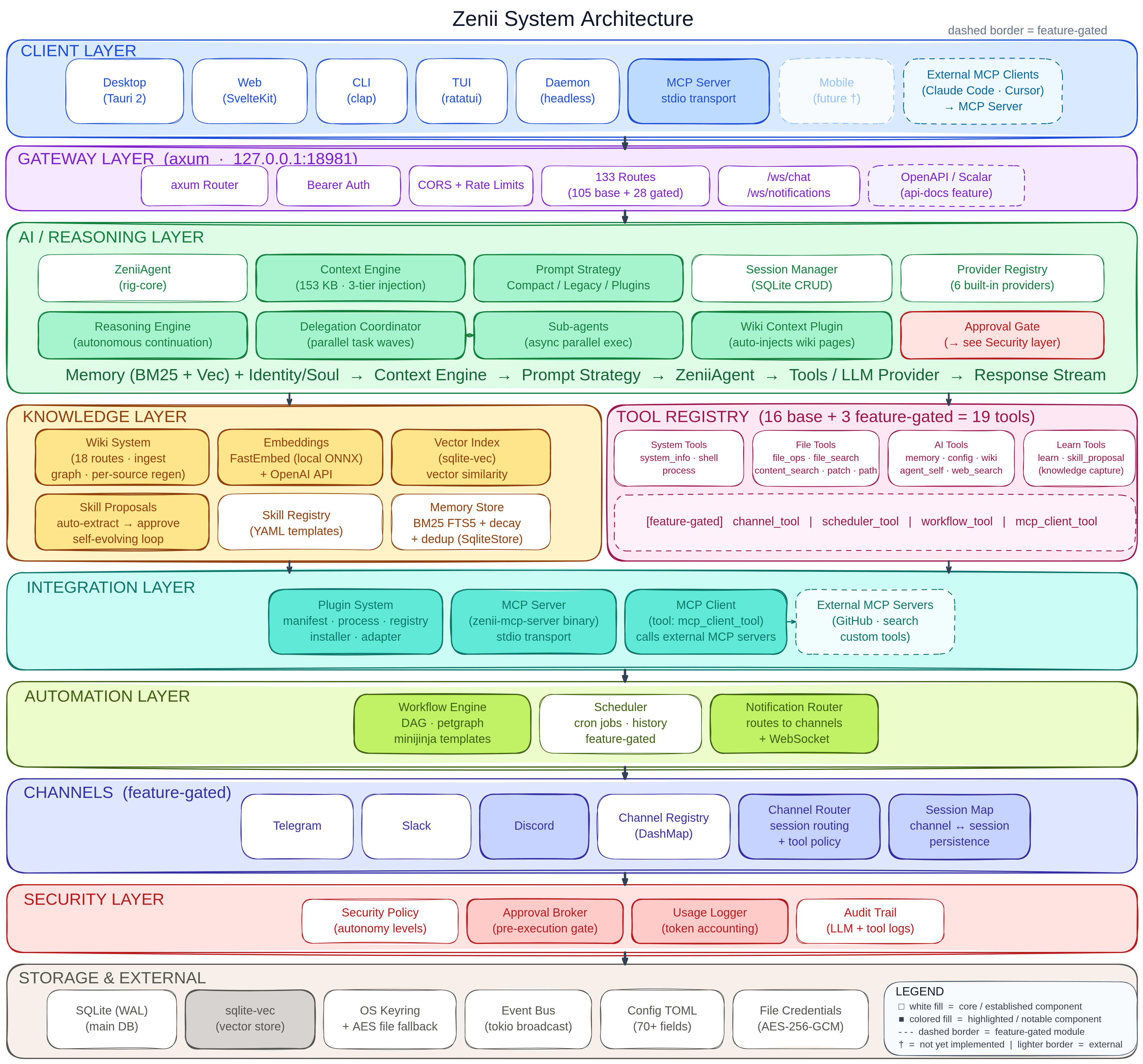
One Rust library crate (zenii-core) holds all business logic. Five thin binary crates (daemon, CLI, TUI, desktop, MCP server) are shell wrappers around the same axum gateway, SQLite database, agent loop, and tool registry.
Interfaces
| Binary | Use it for |
|---|---|
zenii-daemon | Local HTTP + WebSocket API server — the core of everything |
zenii | Quick prompts, shell pipelines, terminal workflows |
zenii-tui | Interactive terminal UI |
zenii-desktop | Native Tauri desktop app |
zenii-mcp-server | Expose all 19 Zenii tools to Claude Code, Cursor, VS Code |
Capabilities
| Domain | What it does |
|---|---|
| Memory | Persistent semantic recall — BM25 field weighting, temporal decay, vector deduplication, content-addressed dedup |
| Karpathy LLM Wiki | Ingest PDFs, DOCX, PPTX, XLSX, images — knowledge graph, AI query, auto-lint |
| AI Agent | Multi-step reasoning, tool use, streaming, delegation with human approvals |
| Tools (19) | Shell, file ops, web search, process control, patch, memory, wiki — one registry, every interface. Tool output compression keeps context lean (configurable per-tool line/result limits) |
| Providers (6+) | OpenAI · Anthropic · Gemini · OpenRouter · Vercel AI Gateway · Ollama · any OpenAI-compatible endpoint |
| Workflows | TOML/YAML DAG chains — tools, conditionals, loops, parallel steps, run history, cancellation |
| Scheduler | Cron + interval jobs, each run as a full agent turn with access to all tools |
| Channels | Telegram · Discord · Slack — inbound routing, unified inbox, threaded conversations (feature-gated) |
| PAR (Polyglot Agent Runtime) | Run external GitHub code (Python via uvx, Node via npx) as tools — dependencies installed on demand into an isolated cache (no bundled sidecar), with self-healing on failure |
| MCP | Server: expose all tools to Claude Code, Cursor, Gemini CLI, Windsurf · Client: consume external MCP servers |
| Security | OS keyring · AES-256-GCM encryption · surface-based permission model (CLI/desktop/TUI/MCP/API) |
Prepend a hint prefix to any prompt to route it to a specialized model without changing your provider config:
# Route to a reasoning-capable model
curl -s -X POST http://localhost:18981/chat \
  -H "Authorization: Bearer $ZENII_TOKEN" \
  -d '{"prompt":"hint:reasoning Explain how the Raft consensus algorithm handles leader election"}'

# Route to a fast low-latency model
curl -s -X POST http://localhost:18981/chat \
  -H "Authorization: Bearer $ZENII_TOKEN" \
  -d '{"prompt":"hint:fast What time is it?"}'
Configure each hint target in config.toml:
routing_hint_reasoning = "claude-opus-4-5"
routing_hint_fast = "gpt-4o-mini"
routing_hint_vision = "gpt-4o"
routing_hint_summarize = "claude-haiku-3-5"
If a hint has no configured target, the default model is used and a warning is logged.
Knowledge compiled at ingestion time, not re-derived at every query. Drop in a document; Zenii extracts, indexes, and links the knowledge so your agent can answer questions against it instantly.
# Ingest a runbook, spec, or doc
curl -s -X POST http://localhost:18981/wiki/ingest \
  -H "Authorization: Bearer $ZENII_TOKEN" \
  -d '{"url": "https://example.com/runbook.pdf"}'

# Query it — answers come from the compiled knowledge base
curl -s -X POST http://localhost:18981/wiki/query \
  -H "Authorization: Bearer $ZENII_TOKEN" \
  -d '{"query": "What does section 3 say about rollback?"}'
Full guide: docs.zenii.sprklai.com/wiki
As MCP server — expose all 19 Zenii tools to any agent:
// .mcp.json — works with Claude Code, Cursor, Gemini CLI, Windsurf, Codex
{
  "mcpServers": {
    "zenii": {
      "command": "zenii-mcp-server",
      "args": ["--transport", "stdio"]
    }
  }
}
As MCP client — Zenii can also consume external MCP servers. Add GitHub, Postgres, Filesystem, or any custom MCP server and its tools become available in your agent loop alongside Zenii's own 19.
AGENT.md — a machine-readable guide written for AI coding agents (Claude Code, Cursor, Gemini CLI, Windsurf, Codex). Drop it in your project or point your agent at it to give it a complete map of Zenii's API surface.
Full guide: docs.zenii.sprklai.com/mcp
Run external code from GitHub as Zenii tools. Write a Python script or Node module, declare it in a manifest, and Zenii handles everything: dependency installation, runtime detection, isolation, and automatic repair on failure.
# Check runtimes
zenii runtime status

# Install uv (Python runtime) if needed
zenii runtime install uv

# Install a Python tool from GitHub
zenii plugin install https://github.com/yourteam/repo-analyzer

# Use it immediately
zenii chat
# > analyze the complexity of my Python project
zenii-plugin.toml:
[plugin]
name = "repo-analyzer"
version = "0.1.0"
description = "Analyze repository structure"

[[tools]]
name = "analyze"
description = "Analyze repo complexity"
binary = "main.py"
runner = "uvx"
package = "git+https://github.com/yourteam/repo-analyzer@v0.1.0"
required_runtime = "python>=3.11"

[[tools.tests]]
input = { repo_path = "." }
expect = { file_count = { ">": 0 } }
main.py:
import sys, json
# Tool receives JSON on stdin, returns JSON on stdout
data = json.loads(sys.stdin.read())
result = analyze(data["repo_path"])
print(json.dumps({"success": True, "output": result}))
uv/npx into an isolated cache (no fat sidecar)zenii runtime install uvtests auto-repair on failure: dependency errors get the missing module added, logic bugs get a reflective patchFull guide: docs.zenii.sprklai.com/par-guide
Workflows — chain tools into DAGs with conditionals, loops, and parallel steps:
# ~/.config/zenii/workflows/daily-digest.yml
name: daily-digest
steps:
  - id: search
    tool: web_search
    args: { query: "Rust ecosystem news today" }
  - id: store
    tool: memory_store
    args: { key: "digest/{{date}}", content: "{{steps.search.result}}" }
Run manually: POST /workflows/daily-digest/run
Natural Language Workflow Creation — describe a workflow in plain English; Zenii generates the TOML and opens the visual builder automatically. Available from the Workflows page (toggle to "Describe in English") and from the chat window (⬡ Workflow button, mutually exclusive with Delegate).
Scheduler — trigger any prompt or workflow on a cron schedule, executed as a full agent turn with access to all tools:
curl -s -X POST http://localhost:18981/scheduler/jobs \
  -H "Authorization: Bearer $ZENII_TOKEN" \
  -d '{"name":"daily-digest","cron":"0 8 * * *","prompt":"Run the daily-digest workflow"}'
Full guide: docs.zenii.sprklai.com/workflows · docs.zenii.sprklai.com/scheduler
curl -fsSL https://raw.githubusercontent.com/sprklai/zenii/main/install.sh | sh
Installs zenii (CLI) and zenii-daemon to ~/.local/bin.
Download and run the desktop installer (.msi or .exe) from
GitHub Releases.
For headless / CLI-only, grab zenii.exe and zenii-daemon.exe from the same page.
cargo install --git https://github.com/sprklai/zenii zenii zenii-daemon
Full platform notes: Installation & Usage
Prerequisites: Rust 1.85+, Bun, SQLite development libraries.
git clone https://github.com/sprklai/zenii.git
cd zenii
cargo build --release -p zenii-daemon       # headless server
cargo build --release -p zenii-cli          # CLI client
cd crates/zenii-desktop && cargo tauri build # desktop app
Full setup guide: docs/development.md

Zenii runs on ARM — same binary, same API. Deploy it on a Raspberry Pi, attach tools, and your hardware becomes an AI-addressable endpoint over HTTP.
localhost:18981/api-docs (daemon must be running)Typo fixes, tests, and focused bug fixes can go straight to a PR. Larger feature work should start with CONTRIBUTING.md.
If Zenii is useful to you — star the repo and tell a developer friend.
MIT
Claim this server with your GitHub account to request manual ownership verification.
Link to the catalog listing for Zenii MCP server from your README. This badge does not certify ownership, compatibility or security.
[](https://awesome-mcp.com/servers/zenii)Public repository statistics could not be verified. Check the configured source address; unavailable counts are not zero.
来源、范围和时段分别列出;不相加,不代表安装人数、活跃用户或安全审核。
尚无已审核的包 / 镜像标识,暂不展示下载统计。
Alternative and complementary servers in the same category
Store and retrieve entities, relations and observations in a persistent local knowledge graph.
Organize problem solving into revisable, branching thought steps through an MCP tool.

Query-aware context compression with an MCP plugin for coding agents, plus Python and HTTP interfaces for reducing the context sent to a language model.