

A Model Context Protocol (MCP) server for controlling Chrome with debugging capabilities, userscript injection, and extension support.
Repository stats unavailable
Browser & Scraping
ZYNLEX is a Windows developer browser whose MCP server lets coding agents like Claude Code and Codex test your localhost app in the browser window you already have open.
ZYNLEX: a developer browser with an MCP server for coding agents is cataloged as an MCP server attributed to webtools-dotcom. ZYNLEX is a Windows developer browser whose MCP server lets coding agents like Claude Code and Codex test your localhost app in the browser window you already have open. It is categorized under browser automation. See the capability inspector for recorded interfaces and their independent review status; consult upstream documentation for the current interface.
Installation configuration is not reviewed. No executable setup is offered for this entry; inspect the source repository before proceeding.
Catalog license label: Apache-2.0. Check the source repository's current license and terms before using, modifying or distributing this software.
能力定义尚未审核。未核验的采集内容不会作为可信接口展示。
暂无可展示的已审核记录。这不表示上游不支持此能力。
暂无可展示的已审核记录。这不表示上游不支持此能力。
暂无可展示的已审核记录。这不表示上游不支持此能力。
Email delivery is not connected. This page does not collect email addresses or create subscriptions.
Browse the registry for current listings instead.
Reviews for ZYNLEX: a developer browser with an MCP server for coding agents are not available yet
Review publishing and storage are not connected. This page does not collect or publish ratings or comments, including after sign-in.
Windows only for now; macOS and Linux are on the roadmap and described as a real port.
No. It only sees localhost tabs and staging environments you have ticked for agent access; production is refused.
No; keep Playwright for CI, headless runs and other browsers, while ZYNLEX covers the shared build-and-fix loop.
README.md · 3e0a835be683 · 采集于 2026-11-13 14:09:26 UTC
保留上游原文,不做 AI 改写。为安全起见过滤脚本、表单和不安全链接。
当前显示最后一次成功采集的文档快照,请以来源页面为准。
The browser you share with your AI coding agent.
Claude Code, Codex and other coding agents test your localhost app in the ZYNLEX window you already have open.
You watch every click, point at what's broken, and take over whenever you want.
It costs the agent less than Playwright MCP, and it's a developer's browser in its own right.



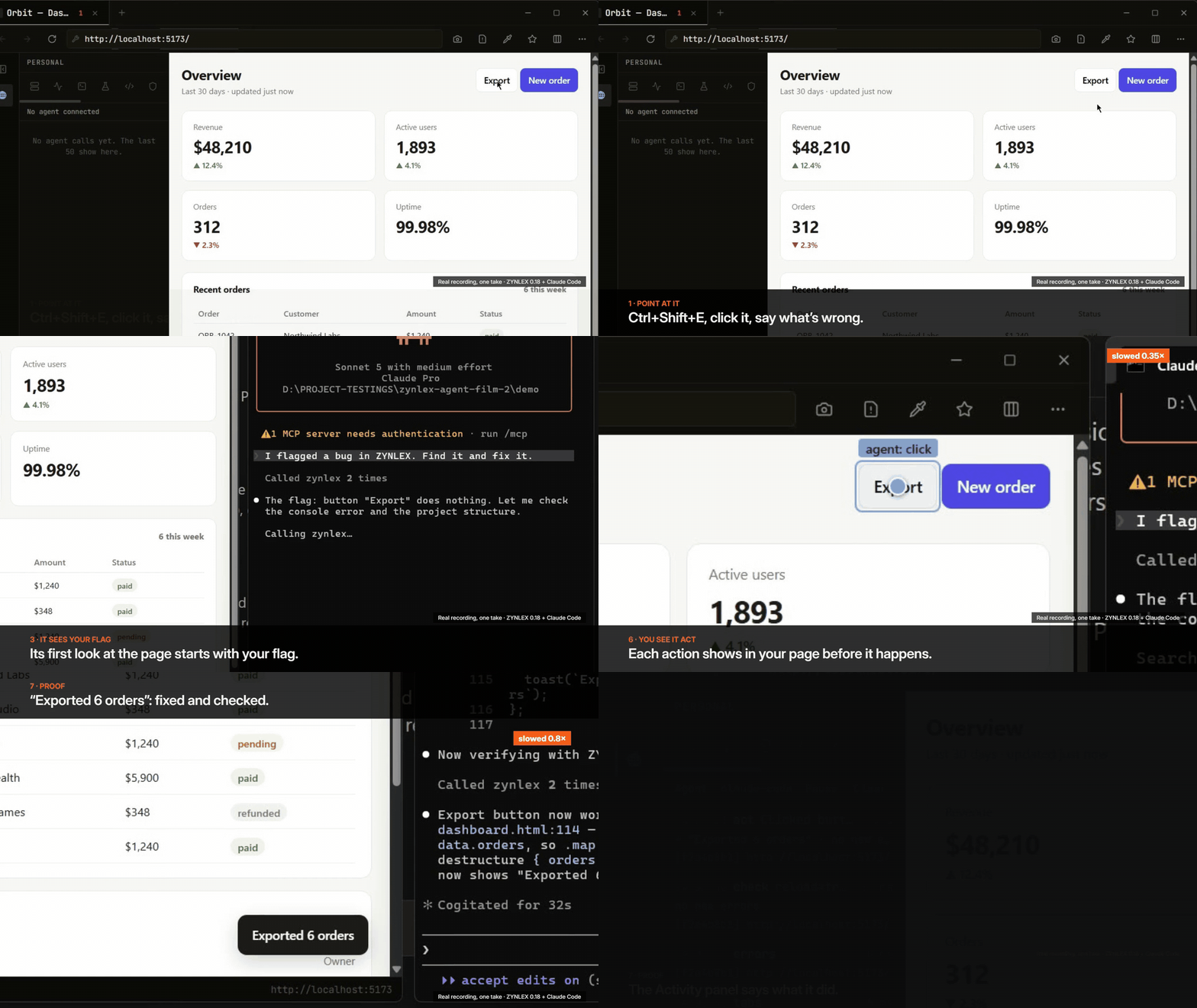
One real take with Claude Code, zoomed and sped up only where marked · Watch the full film with sound (56 s)
then, in a new terminal:
claude mcp add zynlex zynlex-mcp
Ask a coding agent to check your app today and it launches a browser of its own: a fresh profile, not logged in, empty console, somewhere off screen. It doesn't know about the error you hit five minutes ago. You can't point at the button that's wrong; you describe it in words and hope. It clicks around, finds the bug again from scratch, and hands you a summary of what it did.
ZYNLEX turns that around. The agent works in your browser, on the tab in front of you. You both see the same page at the same time.
You point instead of describing. Press Ctrl+Shift+E, click the broken element, type a note. The agent's next reply starts with it, and with the element's ref so it can act on it straight away:
Developer flagged e15 button "Apply": does nothing on mobile
You show it the bug instead of writing steps. Start Record Steps for Agent, reproduce the bug the way you found it, stop. The agent reads every click and key, and the error or failed request each one caused:
2. press Enter in textbox "New task" [e2] → ReferenceError: addTsk is not defined
5. click button "Load tasks" [e8] → GET /api/tasks 404
It already knows what broke. ZYNLEX records errors and failed requests the whole time you use it. When an agent connects, its first look at a tab starts with what happened before it arrived, grouped and counted, so it doesn't have to reproduce what you already saw.
You can watch it, stop it, or take over. Every action happens in the visible page, and the Agent Activity panel lists each call. Pause in the status bar holds the agent while you use the page yourself; on Resume it's told what changed. Stop disconnects it.
The fix stays fixed. Once the bug is fixed, the agent turns your recording into a Playwright test, with your mocks, so it runs in CI from then on. ZYNLEX finds the bug; Playwright keeps it from coming back.
It's already logged in, because you are. No test accounts, no saved cookies, no passwords in a prompt. The agent uses the session you have open.
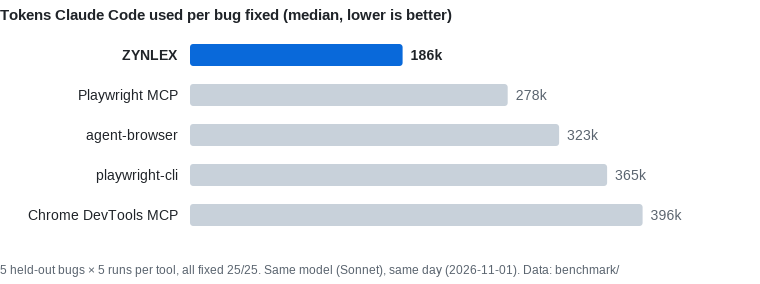
Each action already returns what changed on the page and any new errors, so the agent rarely needs a second look. Steps it already knows (type, then press Enter; click Delete, then accept the confirm) go in a single call. Claude Code re-sends its whole context on every turn, so fewer turns means fewer tokens.
The latest run (2026-11-09, ZYNLEX 0.18), on the same day as Playwright MCP: Claude Code fixing five bugs it had never seen, five runs each.
| ZYNLEX | Playwright MCP | |
|---|---|---|
| Bugs fixed | 25/25 | 25/25 |
| Tokens per bug (median) | 176k | 262k |
| Cost per bug (median) | $0.124 | $0.196 |
| Turns per bug (median) | 10 | 13 |
That's 33% fewer tokens and 37% lower cost, and fewer tokens on every one of the five bugs. It's our own harness, on one machine, with one model family, which is why the harness, the buggy apps, the graders and every run's result are in benchmark/ for you to rerun.
Real replies from the v0.17.0 release, word for word. The agent calls open with http://localhost:7720/:
http://localhost:7720/ "Tasks" [dfc7d5cc]
Page:
h1 "Tasks"
textbox "New task" [e2] value=""
button "Add" [e6]
combobox "Sort" [e3] value="Oldest" collapsed
  option "Oldest" [e22] selected
  option "Newest" [e25]
button "Load tasks" [e8]
No new errors or failed requests.
Then one act with two steps, typing into e2 and pressing Enter in it:
Typed "Release check" into textbox "New task" [e2] value=""
Pressed Enter in textbox "New task" [e2] value=""
Page changes:
+ "Release check"
No new errors or failed requests.
After each code change the agent calls check, which waits for the page to settle and lists only what's new.
Both, for different jobs. Keep Playwright for CI.
| ZYNLEX | Playwright MCP | |
|---|---|---|
| Where the agent works | Your open browser, in front of you | A browser it launches, or your Chrome through an extension |
| Point at an element, record a bug, pause and take over | ✅ in the page you're using | Partly: annotate and record, in its own dashboard |
| Errors from before the agent connected | ✅ kept across page loads | From when it connects |
| Logged in as you | ✅ | With the extension; otherwise saved state or a login flow |
| Mocks you can also see and edit in the UI | ✅ | ❌ |
| Turns a recording into a Playwright test | ✅ | ✅ (codegen) |
| Any website | ❌ localhost and staging you allow | ✅ |
| Headless, CI, Firefox, WebKit | ❌ | ✅ |
| macOS and Linux | ❌ Windows only, for now | ✅ |
Download the installer and run it. It puts zynlex-mcp on your PATH.
The installer isn't code-signed yet, so Windows may say "Windows protected your PC": click More info → Run anyway. Each release lists its installers' SHA-256 checksums, so you can check the file is the one built here (Get-FileHash .\ZYNLEX_*_x64-setup.exe in PowerShell).
In a new terminal, connect your agent:
claude mcp add zynlex zynlex-mcp
Settings → AI agents has the snippet for Codex, Cursor, Antigravity, OpenCode and any other MCP client.
Open your app in ZYNLEX and ask your agent to check it: "The Add button does nothing when I press Enter. Fix it."
| Tool | What it does |
|---|---|
tabs, open | List your tabs and running dev servers; open or switch to one |
snapshot | The page's interactive elements, with refs to act on |
act | Click, type, select, press, hover, drag, upload, go back, answer dialogs; up to 10 steps in one call |
check | Wait for the page to settle, then list new errors and failed requests |
errors, network | The console at any level; requests with headers and bodies |
screenshot | The view, one element or the whole page |
viewport | Emulate a phone or tablet, with touch |
wait_for | Wait for text to appear or go, or the URL to change |
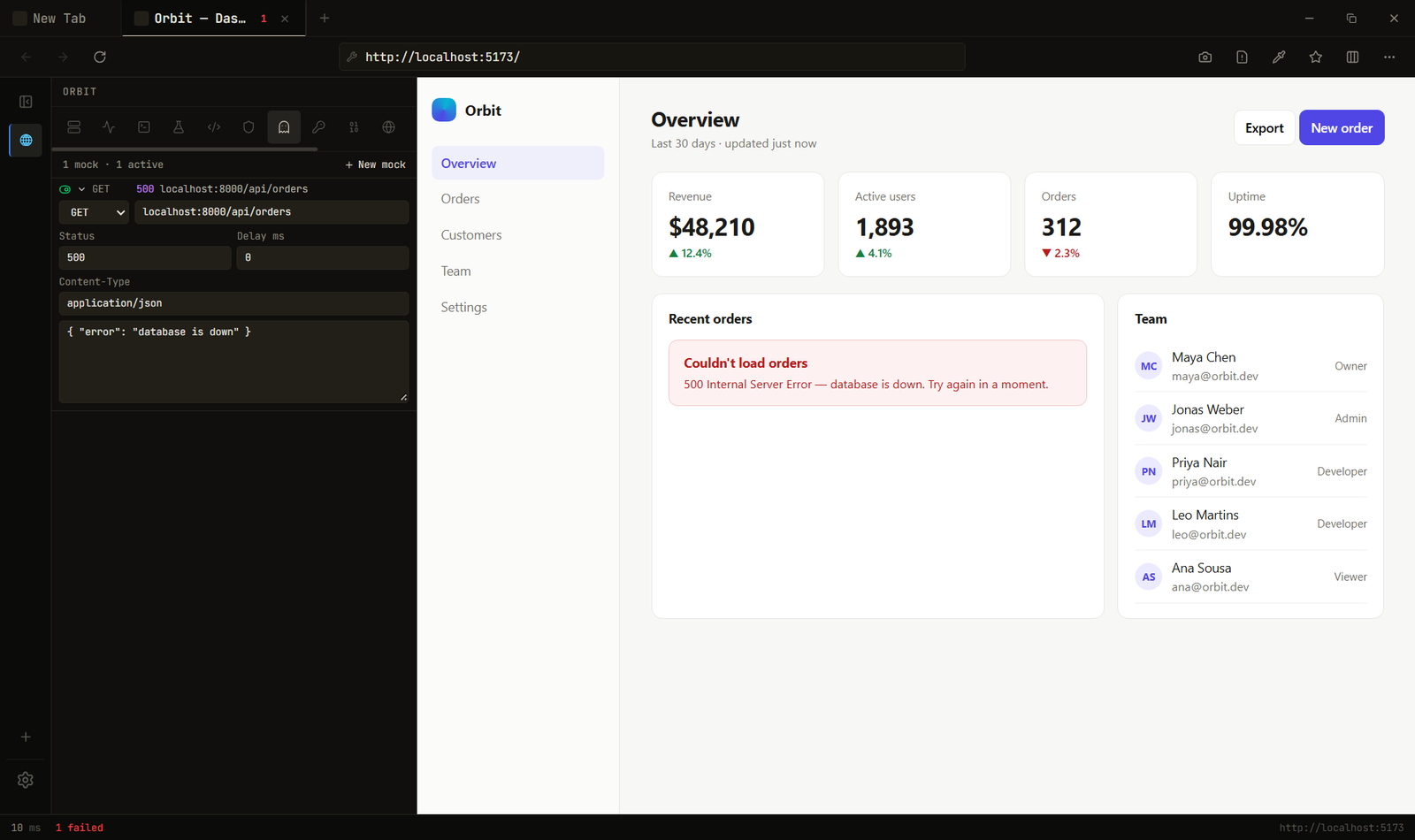
mock | Fake API responses or add request headers, shown in your panels too |
eval | Run JavaScript in the page |
recording | Your recorded steps, or a Playwright test made from them |
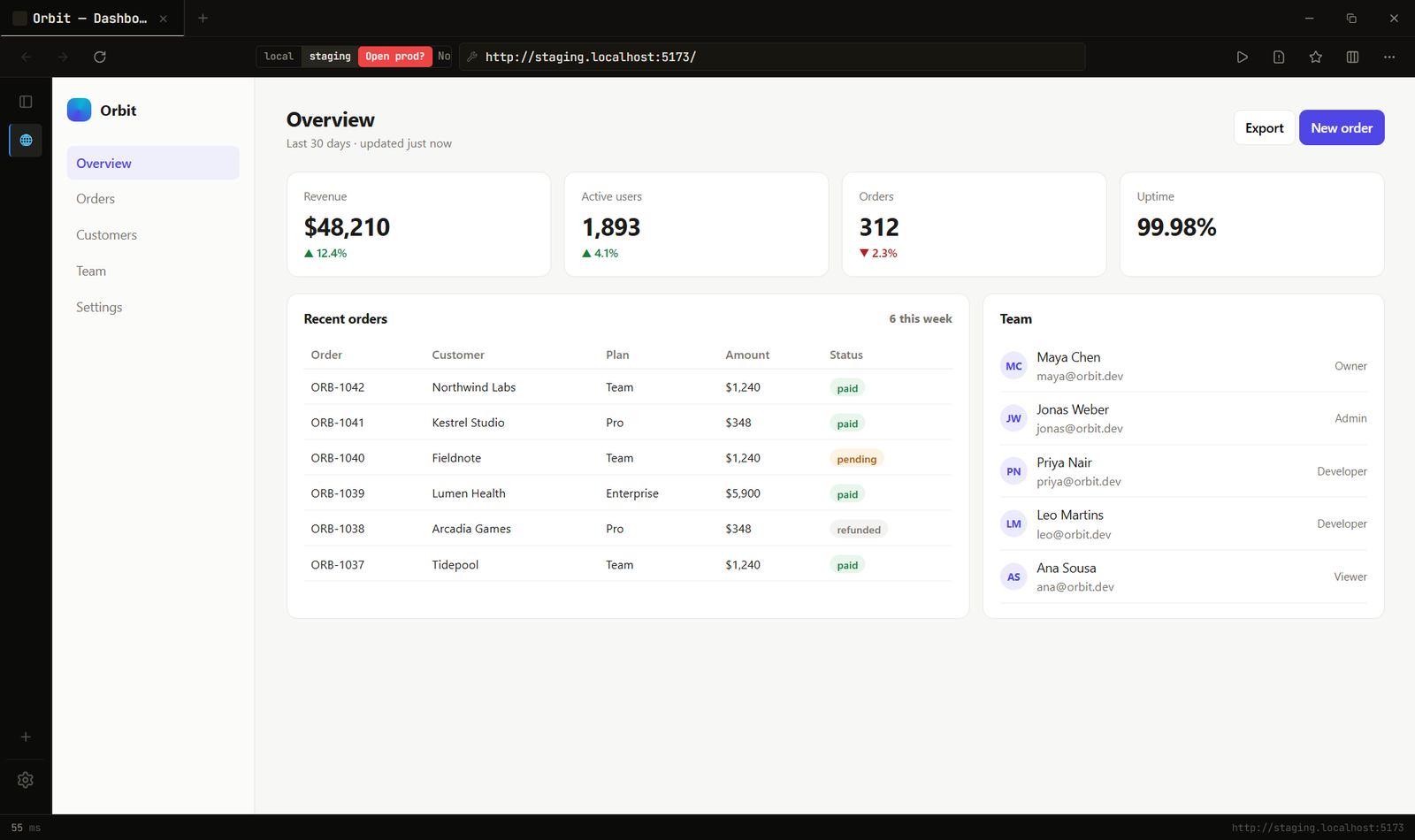
localhost, plus any staging environment you tick agent on in Settings → Environments. Never production, even if you tick it. Page text, console messages and response bodies are passed to the agent as data, not instructions. The status bar shows when an agent is connected. Every detail is in docs/agent-interface.md.
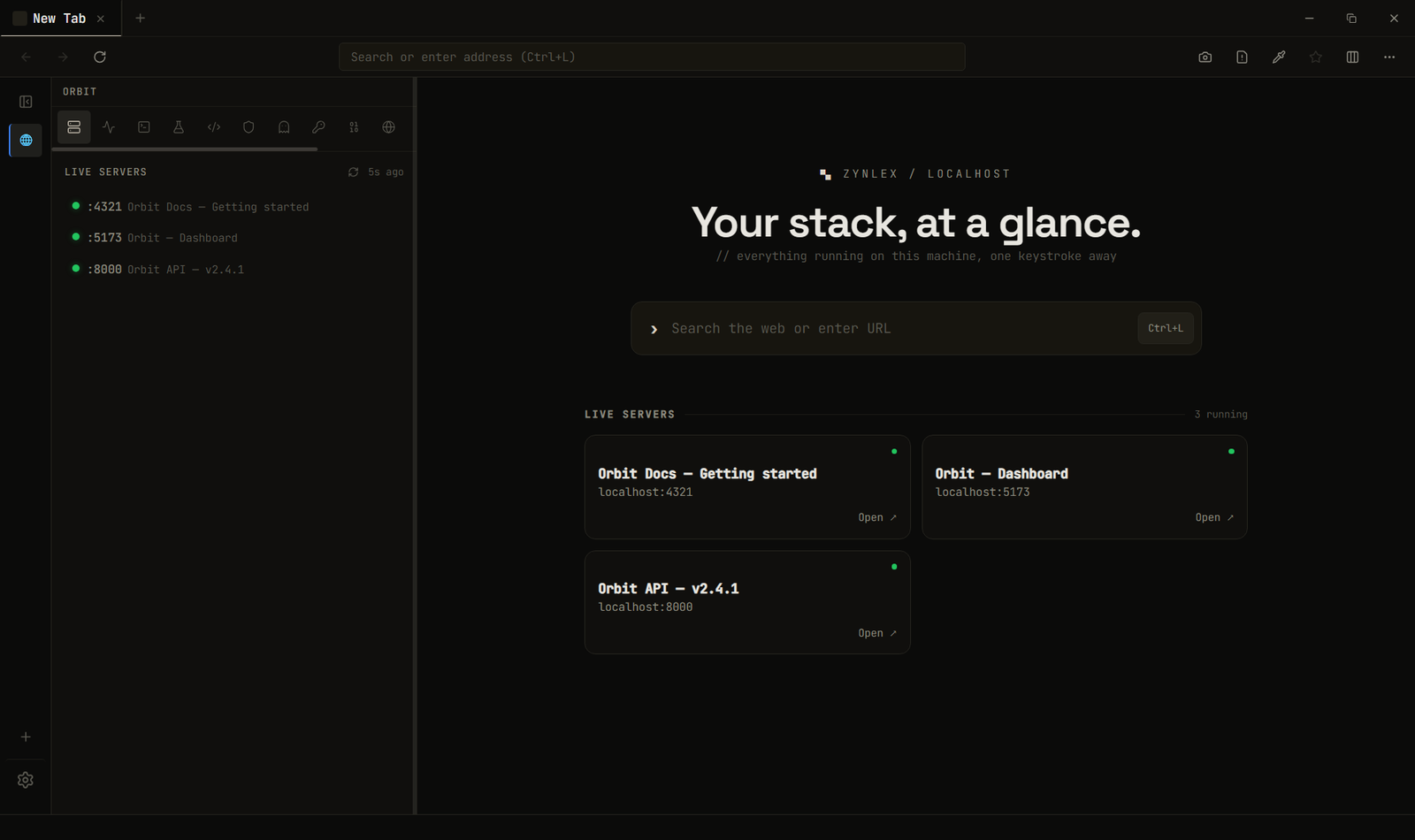
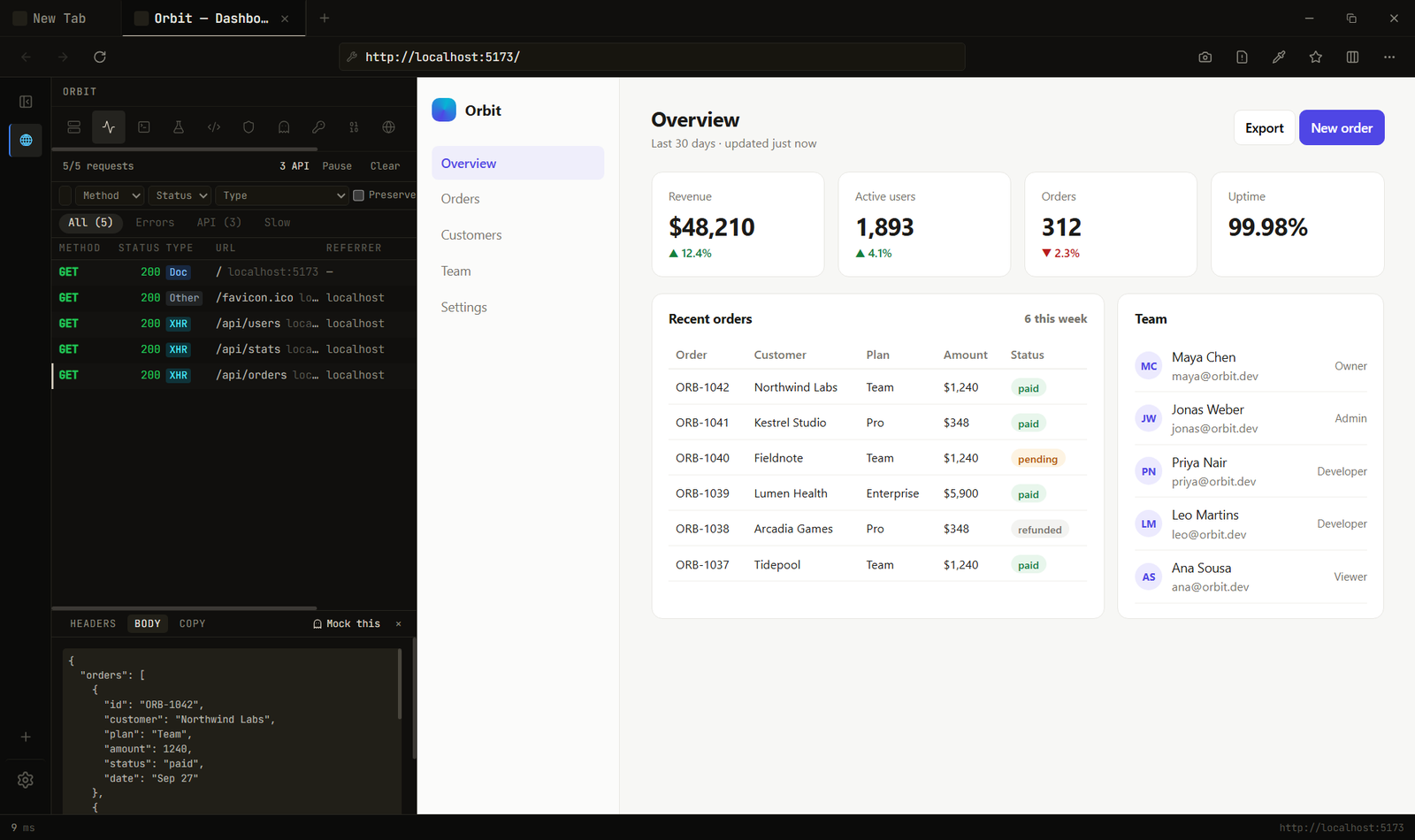
Before agents could use it, ZYNLEX was the browser for localhost, and it still is. A new tab lists the dev servers running on your machine. The sidebar has what you'd otherwise open four apps for, and an agent can use all of it too.
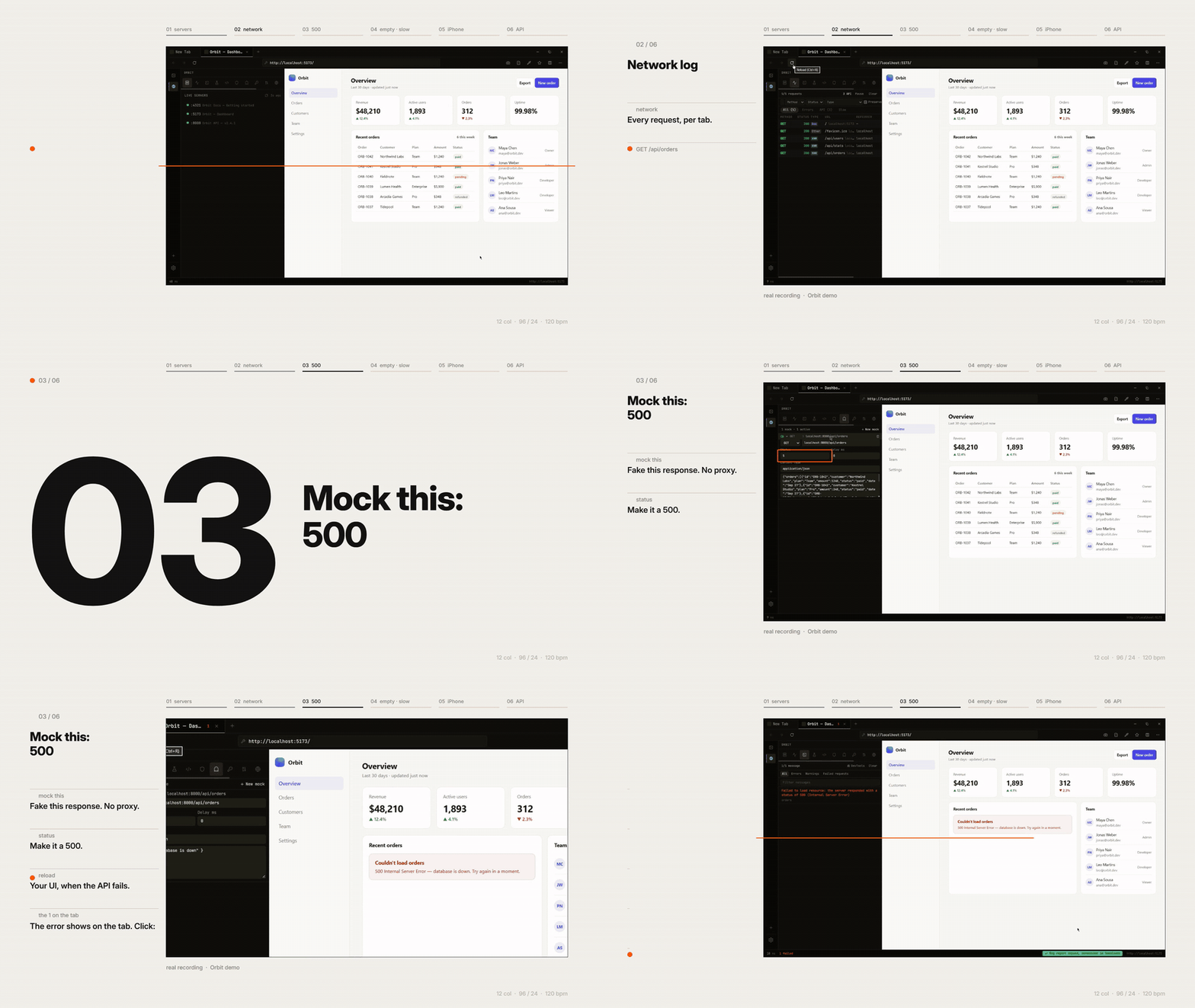
Watch the full tour in 1080p · Watch the workflows film (73 s) · Website
Workspaces keep each project's tabs, rules and saved requests apart, Ctrl+K finds everything, and any command can have a shortcut or a toolbar button.
It's light: a 4 MB installer because it uses the WebView2 (Chromium) runtime already in Windows, and less than half Chrome's memory at idle. Hidden tabs are suspended and then discarded on timers you set, and localhost tabs never are, so hot reload keeps working. The measurements.
No account, no telemetry. The only network call it makes on its own is an update check against this repo's releases.
Your servers, on the new tab page:
Network log, with a response open:
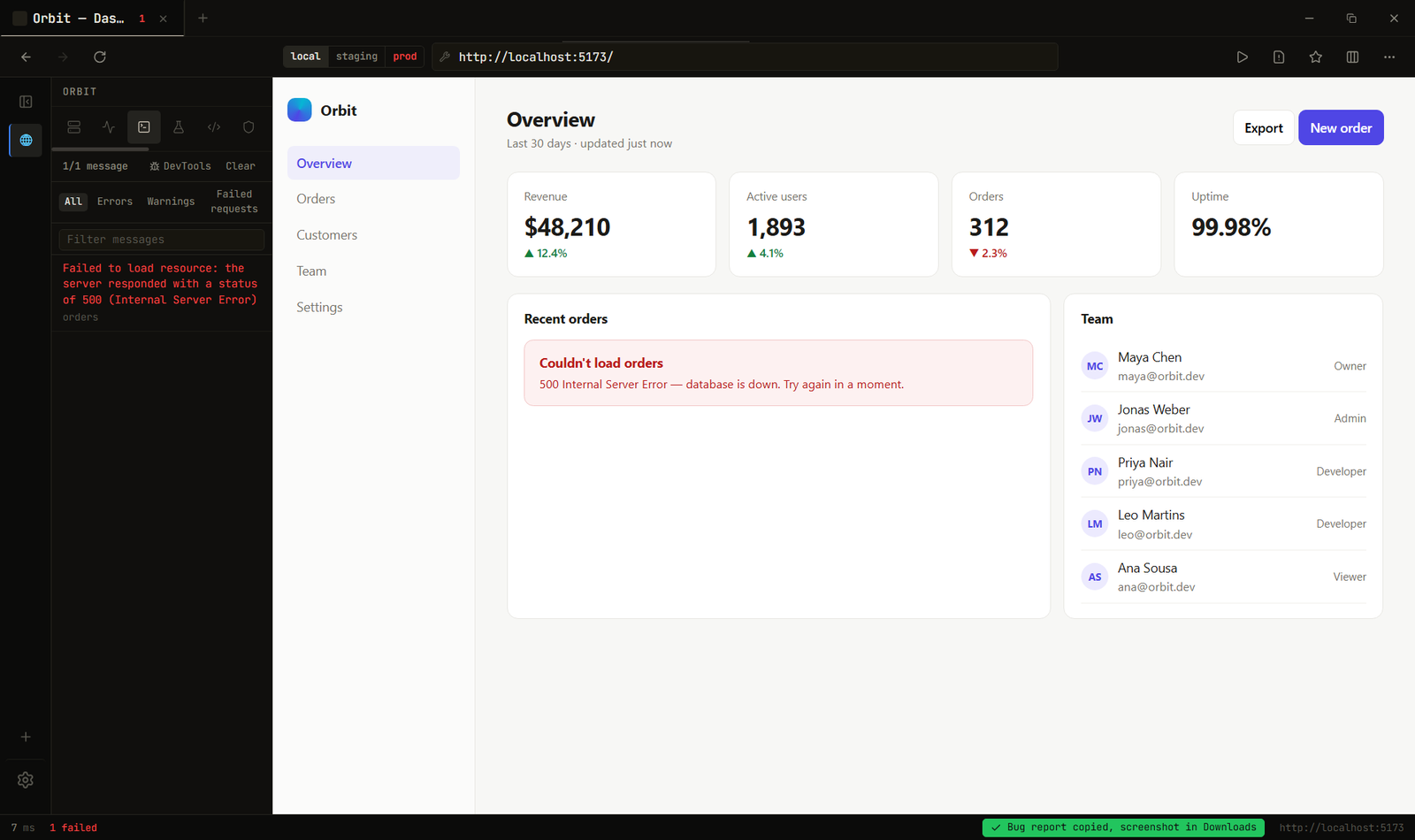
A mocked 500, and how the page handles it:
The same page on local, staging and prod:
A bug report, one click:
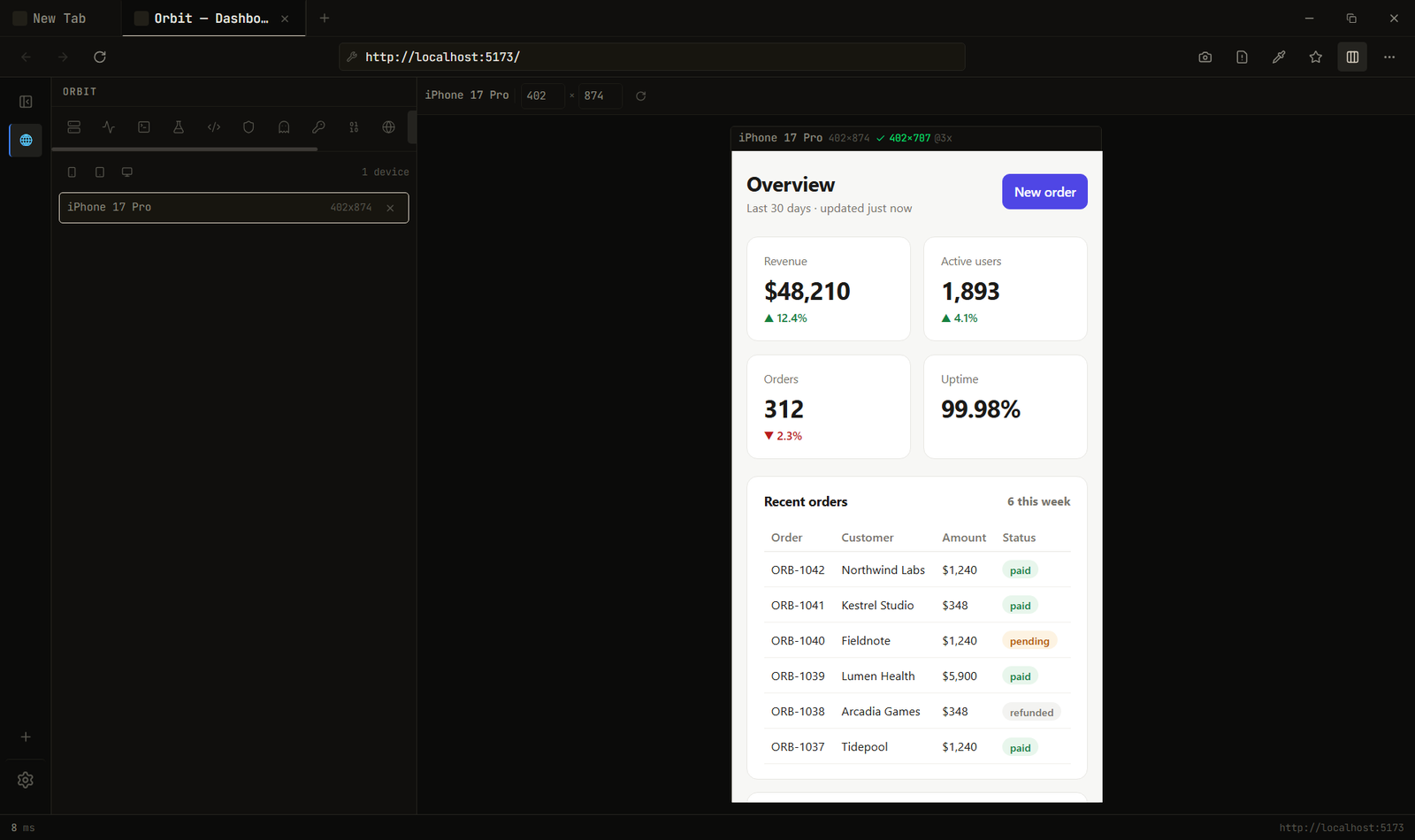
A device viewport at 1:1:
A few months ago I was watching a video by @crynta and got stuck on the comments underneath, where people were asking for a lightweight browser without telemetry. I wanted one too, but the one I needed was for development: the four things I check constantly (which port is that, what did that request return, how does this look on a phone, what happens with this header) lived in four separate windows. So I put them in the browser.
Then I started handing more of the checking to coding agents, and watched them work in a browser I couldn't see. They'd launch a clean Chrome, miss the error I'd just been looking at, and spend half the run getting back to where I already was. Meanwhile my own browser had already captured all of it: every error, every request, the page I was pointing at.
So ZYNLEX gave the agent a way in, to the browser I'm already using, with me able to see every step.
localhost and staging you allow, nothing else. For other sites, use Playwright.Should I uninstall Playwright? No. Keep it for CI, headless runs and other browsers. ZYNLEX is for the loop where you and an agent build and fix your app together; the tests it writes run on Playwright.
Which agents work with it? Any MCP client. Settings → AI agents has setup for Claude Code, Codex, Cursor, Antigravity and OpenCode. The benchmark uses Claude Code.
Can the agent see my other tabs, or my banking site?
No. It only sees localhost tabs and staging environments you've ticked agent on. Production is refused even if ticked.
Will websites work in it? Yes. Tabs render with WebView2, Microsoft's packaging of Chromium, the same engine as Chrome and Edge.
Is it Electron? No. It's Tauri and Rust on the WebView2 runtime that ships with Windows, which is why the installer is 4 MB.
Is it free? Free and open source under Apache-2.0. No account, no telemetry.
If ZYNLEX saves your agent tokens, or you a few windows, a star helps other developers find it.
Issues and pull requests are welcome. For anything non-trivial, open an issue first so we don't both write it. From source: pnpm install, then pnpm tauri dev.
Claim this server with your GitHub account to request manual ownership verification.
Link to the catalog listing for ZYNLEX: a developer browser with an MCP server for coding agents from your README. This badge does not certify ownership, compatibility or security.
[](https://awesome-mcp.com/servers/zynlex)Public repository statistics could not be verified. Check the configured source address; unavailable counts are not zero.
来源、范围和时段分别列出;不相加,不代表安装人数、活跃用户或安全审核。
尚无已审核的包 / 镜像标识,暂不展示下载统计。
Alternative and complementary servers in the same category
A Model Context Protocol (MCP) server for controlling Chrome with debugging capabilities, userscript injection, and extension support.

An MCP server that lets AI assistants browse websites and extract content using optional CSS selectors.

An MCP server that reads pages, fills forms, takes screenshots, and hands the browser to a person for logins or CAPTCHAs.